

Mortgage document automation uses AI-based intelligent document processing (IDP) to turn loan paperwork into validated, loan origination system (LOS) ready data, then routes exceptions to a human reviewer instead of burying an underwriter in a stack of PDFs. The technology reads pay stubs, bank statements, and tax returns, cross-checks the numbers against each other, and flags what doesn't add up. Lenders using AI automation for this work report saving 5 to 8 hours per loan file, with some commercial packages seeing processing time drop by as much as 41%.
If you're evaluating this for your brokerage, here's where to start:
- Run a small pilot first. Pick one loan type and 20 to 30 representative files before you touch your full pipeline.
- Gather messy samples on purpose. Include scanned faxes, handwritten notes, and low-resolution phone photos, not just clean digital originals.
- Shortlist two or three vendors and ask each one to process the same sample set so you can compare extraction accuracy side by side.
Key Takeaways
Mortgage document automation works because AI-based IDP replaces fragile template OCR with classification, extraction, and cross-document validation that catches errors before underwriting ever sees them.
| Point | Details |
|---|---|
| Start with high-volume documents | Automate pay stubs, W-2s, and bank statements first since they appear on nearly every file. |
| Measure against a real baseline | Log current processing time for two weeks before piloting, then compare hours saved and manual touch reduction. |
| Prioritize cross-document validation | This catches income and deposit mismatches that simple field extraction misses entirely. |
| Confirm data residency and audit logs | Request encryption standards, SOC 2 attestations, and immutable logs before signing any contract. |
| Autowrite fits Canadian brokerages specifically | It automates intake, extraction, and compliance packaging with Canadian data residency and a 14-day free trial. |
Table of Contents
- What Is Mortgage Document Automation and Why Does It Matter Now?
- How Does the Mortgage Document Automation Workflow Actually Work?
- Which Mortgage Documents and Fields Should You Automate First?
- What Benefits and Metrics Should You Actually Track?
- Where Does Mortgage Document Automation Fall Short?
- How Should You Roll Out Mortgage Document Automation?
- What Security and Compliance Standards Should Vendors Meet?
- How Do You Score Vendors During Evaluation?
- How Does Autowrite Fit This Workflow?
- What Should You Budget for Timeline and Cost?
- What Should You Do This Week?
- Ready to Pilot Mortgage Document Automation?
- Frequently Asked Questions
- Sources
What Is Mortgage Document Automation and Why Does It Matter Now?
Mortgage document automation is the application of intelligent document processing to loan files: software that classifies incoming documents, pulls specific data fields out of them, checks those fields against each other, and hands off clean records to your loan origination system. It's a different animal from the template based optical character recognition (OCR) tools brokerages have used for over a decade.
Template OCR works by matching a document against a fixed layout. It expects a W-2 to look like a W-2 always looks, in the same font, same boxes, same position on the page. The moment a borrower submits a document from a different employer's payroll provider, or a scan comes in slightly rotated, template OCR either fails outright or extracts garbage data that someone still has to catch manually. That fragility is why so many "automated" workflows from the 2010s still required a human to review nearly every file.
Modern IDP layers machine learning models on top of extraction. Instead of expecting a fixed template, it recognizes documents by content and context, the way a person would glance at a page and know it's a bank statement even if they've never seen that bank's exact format. It then applies validation logic, comparing a borrower's stated income on the 1003 loan application against pay stub figures and bank deposit patterns.
That combination, classification plus extraction plus cross-document validation, is what separates real automation from a glorified scanner. One of the most underused parts of the stack is cross-document validation, the ability to automatically flag when declared income doesn't match bank deposits or when a name is spelled two different ways across a file. Reduction in manual loan file interactions of 50 to 60% has been reported by lenders running advanced AI automation, largely because the software catches these mismatches before a person ever opens the file.
How Does the Mortgage Document Automation Workflow Actually Work?
Every serious IDP platform runs loan files through the same general sequence, even if vendors brand the stages differently. Understanding each step tells you what to ask vendors during a demo, and what to watch for once you're live.
- Capture and ingest. Documents arrive by email, upload portal, fax, or direct API feed from a point-of-sale (POS) system. Good platforms accept all of these without forcing brokers to re-key or re-upload anything.
- Normalization. Scanned images get cleaned up: deskewed, deblurred, and converted to a consistent resolution so extraction models have a fair shot at reading them.
- Document classification. The system identifies what it's looking at, a W-2, a bank statement, a purchase agreement, without relying on a filename or folder structure.
- Field extraction. Specific data points get pulled out: borrower name, Social Security number, gross income, account balances, loan amount, closing dates.
- Cross-document validation. Extracted fields get compared against each other across the file. Declared income on the application should roughly match what shows up on pay stubs and bank deposits.
- Confidence scoring. Each extracted field gets a reliability score. High-confidence fields flow straight through; low-confidence ones get flagged.
- Human-in-the-loop review. A reviewer looks only at flagged exceptions, not the entire file, which is where most of the time savings actually comes from.
- Routing and integration. Clean, validated data pushes into the LOS, updating the loan record automatically instead of requiring manual data entry.
Here's what to confirm at each stage before you sign a contract:
- Ask whether classification accuracy holds up on documents from smaller or regional employers and lenders, not just major banks.
- Check whether the platform supports bi-directional syncing with your LOS and POS, meaning updates flow both ways instead of creating a one-way data dump.
- Confirm the vendor supports your e-sign provider and cloud storage setup without requiring a custom integration project.
- Ask for the confidence-score threshold defaults and whether you can adjust them as your team gains trust in the system.
Bi-directional syncing matters more than it sounds like it should. A platform that only pushes data into your LOS but can't pull status updates back out forces your team to keep checking two systems manually, which erases a chunk of the time savings you're paying for.
Which Mortgage Documents and Fields Should You Automate First?
Not every document type delivers the same return on automation effort. Some show up in every single file with predictable formats; others are rare enough that building extraction logic for them isn't worth the investment until later phases.
| Document type | Priority | Key fields to extract first |
|---|---|---|
| 1003 / URLA loan application | High | Borrower name, SSN, loan amount, property address |
| Pay stubs | High | Gross pay, pay period, year-to-date income |
| W-2s | High | Employer name, wages, tax withholding |
| Bank statements | High | Account balances, deposit patterns, overdraft flags |
| Tax returns | Medium | Adjusted gross income, self-employment income |
| Appraisal reports | Medium | Property value, comparable sales, condition notes |
| Title documents | Medium | Legal description, lien status, ownership history |
| Closing disclosures | High | Loan terms, fees, cash to close |
Pick your first pilot set based on volume, variability, and business impact, in that order. A document type you see on every file, like pay stubs, is worth automating first even if it's not the most complex, because the time savings compound across your entire pipeline. A rare document you only see on jumbo loans twice a month can wait.
Field priority follows a similar logic. Start with fields tied directly to underwriting decisions: income figures, loan amounts, account balances, and dates. Fees and boilerplate legal language matter, but they rarely change a lending decision, so they can sit lower on your extraction roadmap.
What Benefits and Metrics Should You Actually Track?
Vendor pitch decks are full of impressive-sounding percentages. What matters is whether those numbers translate to metrics your operations team can measure against your own baseline.
Track these during any pilot:
- Hours saved per loan file, measured from initial document intake to a clean, validated LOS record.
- Percentage reduction in manual loan file interactions, meaning how many times a human had to touch the file versus your pre-automation baseline.
- Exceptions per loan, or how many fields get flagged for human review out of the total extracted.
- Time-to-decision, from complete file to underwriting decision.
- Days-to-close, the metric that ultimately affects client satisfaction and repeat business.
- Per-field extraction accuracy, broken out by document type, not averaged across everything.
Industry reporting gives you real benchmarks to measure against. Lenders using automated document workflows have reported saving 5 to 8 hours per loan, with some processing time reductions reaching 41% on more complex packages. Separately, advanced AI automation has been linked to 50 to 60% fewer manual file interactions for lenders who adopted it at scale.
Structure your pilot measurement plan around a real baseline. Before you turn automation on, spend two weeks logging how long your current process takes per file type, using at least 20 to 30 loans so the sample isn't skewed by one unusually clean or unusually messy file.
Where Does Mortgage Document Automation Fall Short?
No IDP platform gets everything right on day one, and pretending otherwise sets your team up for a rocky rollout.
Handwriting variability is the most persistent technical limitation. A borrower's handwritten note on a bank statement, or a lender's handwritten annotation on a title document, trips up even strong extraction models more often than typed text does. Low-quality scans, phone photos taken at an angle, faxed documents with dropout, compound the problem. Exotic or rare document formats, like foreign income statements or unusual trust documentation, also tend to have lower extraction accuracy simply because the models have seen fewer examples.

Vendor model drift is a quieter risk. Extraction models trained on one set of document formats can degrade in accuracy as document formats shift over time, new payroll providers, new bank statement layouts, without retraining. Ask vendors directly how often their models get retrained and what triggers a retraining cycle.
Most automation failures, though, come from operational choices rather than the technology itself. Picking a pilot sample that's too clean, all recent digital uploads with no faxes or scans, gives you a false sense of accuracy that collapses once you go live. Skipping the integration mapping work between your IDP platform and your LOS creates a data bottleneck that erases your time savings. And setting your human-review threshold too loose, letting too many low-confidence fields pass through unchecked, creates compliance exposure down the line.
Pro Tip: Build cross-document validation into your pilot from day one, not as a phase two upgrade. Comparing declared income against bank deposits and pay stub figures catches both honest data-entry errors and deliberate misrepresentation before a file ever reaches underwriting, and it's far cheaper to catch a mismatch during intake than after closing.
How Should You Roll Out Mortgage Document Automation?
A pilot that's set up carelessly will fail even with excellent software behind it. The sequence below reduces that risk.
- Select a representative sample. Pull 20 to 30 files that include both clean digital uploads and messier scans or faxes, across at least two loan types.
- Define success metrics up front. Decide your acceptance threshold for extraction accuracy, manual touch reduction, and processing time before the pilot starts, not after you see the results.
- Set human review thresholds. Agree on the confidence score below which a field automatically routes to a reviewer, and revisit this number after 30 days of real data.
- Map your LOS and POS integration points. Document exactly which fields need to flow where, and confirm the sync is bi-directional.
- Staff an exceptions queue. Assign a specific team member to handle flagged files daily so exceptions don't pile up and erase your time savings.
- Expand in phases. Move from your pilot document types to the next tier only after your metrics hold steady for a full month.
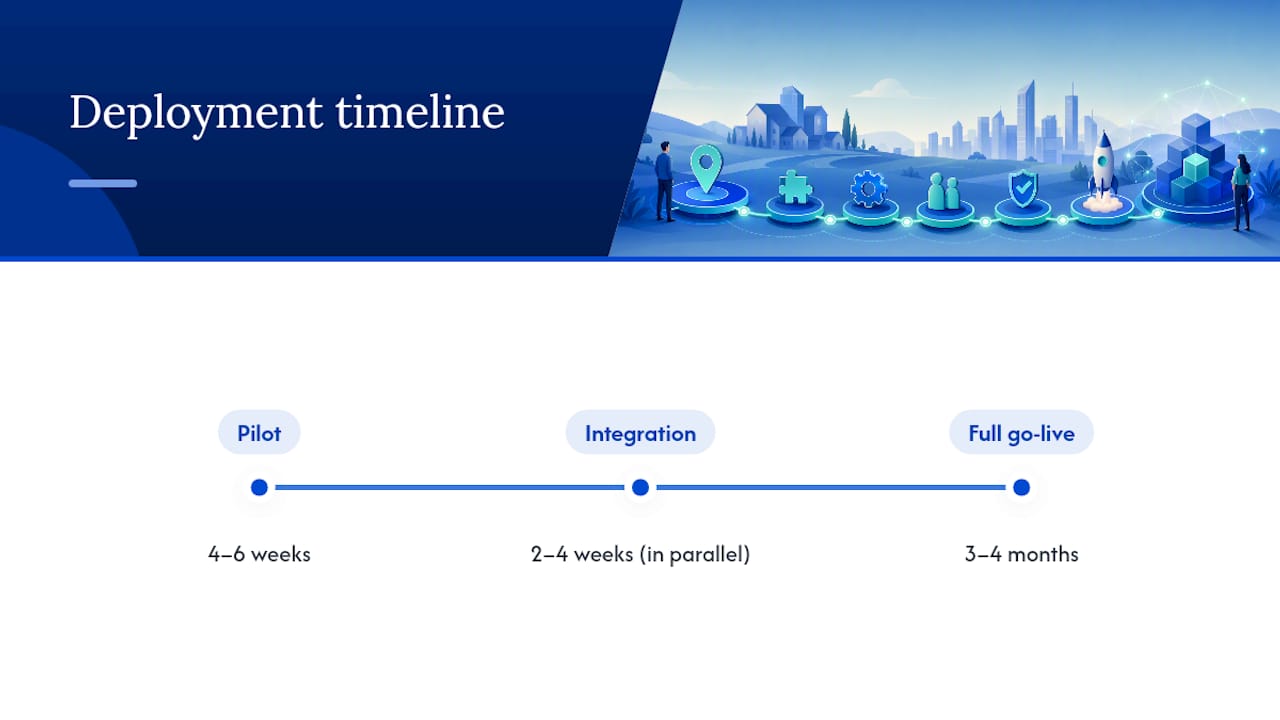
A realistic timeline runs roughly four to six weeks for the pilot itself, another two to four weeks for full LOS integration and staff training, and a phased rollout across additional document types over the following one to two quarters.
Bring these questions to every vendor demo:
- How is your extraction model governed, and how often is it retrained?
- What's your service-level agreement (SLA) for uptime and support response time?
- Do you support native integration with our LOS, or does it require a custom API build?
- Can we see extraction accuracy broken out by document type, not just an overall average?
- What does your onboarding and training process look like for our operations staff?
What Security and Compliance Standards Should Vendors Meet?
Security and auditability questions matter as much as extraction accuracy, especially for brokerages handling borrower Social Security numbers, income data, and bank account details at scale.
| Requirement | What to verify | Why it matters |
|---|---|---|
| Encryption | Data encrypted at rest and in transit | Protects borrower data from interception or breach |
| Compliance attestations | SOC 2 Type II or ISO certification | Independent verification of security controls |
| Access controls | Role-based permissions by team and file type | Limits exposure if one account is compromised |
| Audit logging | Immutable logs of every extraction and edit | Required for regulatory audits and dispute resolution |
| Data residency | Option for in-country or private-cloud storage | Some brokerages face contractual or regulatory residency requirements |
| Explainability | Ability to show why a field was flagged or approved | Supports compliance review of automated decisions |
Data residency deserves particular attention if your brokerage operates under contractual or regulatory requirements that borrower data stay within a specific country's infrastructure. Ask vendors directly where data is stored and processed, not just where the company is headquartered.
Auditability separates enterprise-grade platforms from lightweight tools. If a regulator or auditor asks why a specific field was auto-approved, you need an immutable log showing the confidence score, the extraction source, and any human override, not a vague explanation from your operations team. Explainability for automated decisions is quickly becoming table stakes rather than a nice-to-have feature.
How Do You Score Vendors During Evaluation?
Build a simple weighted scorecard before you sit through a single demo, so you're comparing vendors against your own priorities instead of getting swept up in whichever sales pitch was most polished.
- Extraction accuracy (weight heavily): test with your own sample files, not the vendor's demo data.
- Cross-document validation depth: does it catch mismatches between income, deposits, and application data automatically?
- LOS integration type: native integration scores higher than a generic API that requires custom development.
- Throughput and scaling: can the platform handle your peak monthly volume without slowdowns?
- Deployment options: cloud, private cloud, or on-premises, matched to your data residency needs.
- Support and SLAs: response time guarantees and whether support includes a dedicated account contact.
- Auditability: quality and immutability of logs, explainability of automated decisions.
- Pricing model: per-user, per-loan, or tiered throughput, matched to your loan volume.
Which platform fits best genuinely depends on your volume and validation needs. A smaller brokerage processing a few dozen loans a month will prioritize fast time-to-value and easy setup, while an enterprise lender processing thousands of files will weight cross-document validation and end-to-end orchestration more heavily.
Set pass or fail thresholds before testing begins.
During demos, ask each vendor to process the exact same sample file set you gave the others. Watching three vendors handle the same messy scan or the same handwritten annotation tells you more than any spec sheet.
How Does Autowrite Fit This Workflow?
Autowrite is built specifically for the workflow described throughout this guide, rather than as a general document tool adapted for mortgage use. It handles document intake and classification, extracts and cross-checks fields like income, down payment sources, and loan terms, auto-fills underwriting forms, and assembles e-sign and compliance packages, all inside one system built for Canadian mortgage brokers.
Autowrite is described as an AI-powered operating system that automates document classification and data extraction for mortgage brokers, supporting compliance and Canadian data residency requirements that matter to licensed brokers operating under Canadian regulatory frameworks.
That last point, data residency, matters more to Canadian brokerages than most vendor comparisons acknowledge. A platform built primarily for the US market and adapted afterward often can't offer the same residency guarantees a Canada-first product can. Autowrite's income and down payment analysis features also address one of the cross-document validation gaps discussed earlier: catching mismatches between declared income and bank deposit patterns before a file reaches underwriting.
For brokerages weighing deployment speed against feature depth, Autowrite offers a 14-day free trial, giving teams a real window to run their own sample files through the system rather than relying on a vendor demo alone.
What Should You Budget for Timeline and Cost?
Most mortgage document automation deployments follow a predictable shape, even though exact durations shift based on your document volume and how many systems you need to integrate.
Expect a pilot phase of four to six weeks, focused on a limited document set and sample size. Integration with your LOS and POS typically adds another two to four weeks, running partly in parallel with the pilot rather than strictly after it. Staff training runs one to two weeks and should happen close to go-live so the workflow is still fresh. Full go-live, meaning the system is handling your complete document volume rather than a pilot subset, usually lands three to four months after your first vendor conversation.
Pricing models vary by vendor, but three shapes are common: subscription per-user, where you pay a flat monthly fee per licensed broker or agent; per-loan pricing, where costs scale directly with your closed volume; and tiered throughput pricing, where you pay more as your monthly document volume crosses set thresholds. Enterprise licensing, a flat annual fee regardless of volume, tends to appear only at very high loan volumes.
Budget beyond the subscription fee itself. Professional services for custom integration work, particularly if your LOS requires a non-standard API connection, can add meaningfully to your first-year cost. Ongoing model governance, meaning the vendor's process for retraining extraction models as document formats shift, should be included in your subscription rather than billed separately; ask about this explicitly before signing.
What Should You Do This Week?
Here's a three-step plan you can start today.
- Shortlist two to three vendors this week. Your operations lead should own this step, using the scoring framework above, and narrow the field before requesting any demos.
- Run a 30 to 60 day pilot next. Your operations manager should own execution, with 20 to 30 representative files spanning at least two loan types and a mix of clean and messy scans.
- Measure against your baseline after 90 days. Whoever owns your KPIs should compare hours saved, manual touch reduction, and days-to-close against the two-week baseline you logged before the pilot began.
Bring a tight question pack to every vendor demo: extraction accuracy on your own sample files, LOS integration type, model retraining cadence, support SLA, and data residency options. In the first 30 to 90 days, watch for quick wins on the document types you automated first, pay stubs and bank statements are usually the fastest to show measurable time savings, since they appear on nearly every file and follow relatively predictable formats.
A Practical Note From the Autowrite Team
We built Autowrite because we kept hearing the same complaint from brokers: the paperwork wasn't the hard part of the job, it was just the part eating every hour they had. Automation done well doesn't replace a broker's judgment on a file, it clears the administrative noise so that judgment gets applied to the parts that actually need it, underwriting nuance, client conversations, compliance edge cases. We've focused specifically on the document intake, extraction, and compliance packaging work that Canadian brokers deal with daily, because a generic document tool adapted for mortgages misses the residency, form, and workflow details that make or break adoption on a real brokerage floor.
Ready to Pilot Mortgage Document Automation?
If you've read this far, you already know the gap between a vendor's pitch deck and what actually happens on your first messy loan file. Autowrite closes that gap for Canadian brokers specifically: it's built around the intake, extraction, and compliance packaging work described throughout this guide, with Canadian data residency built in rather than bolted on.
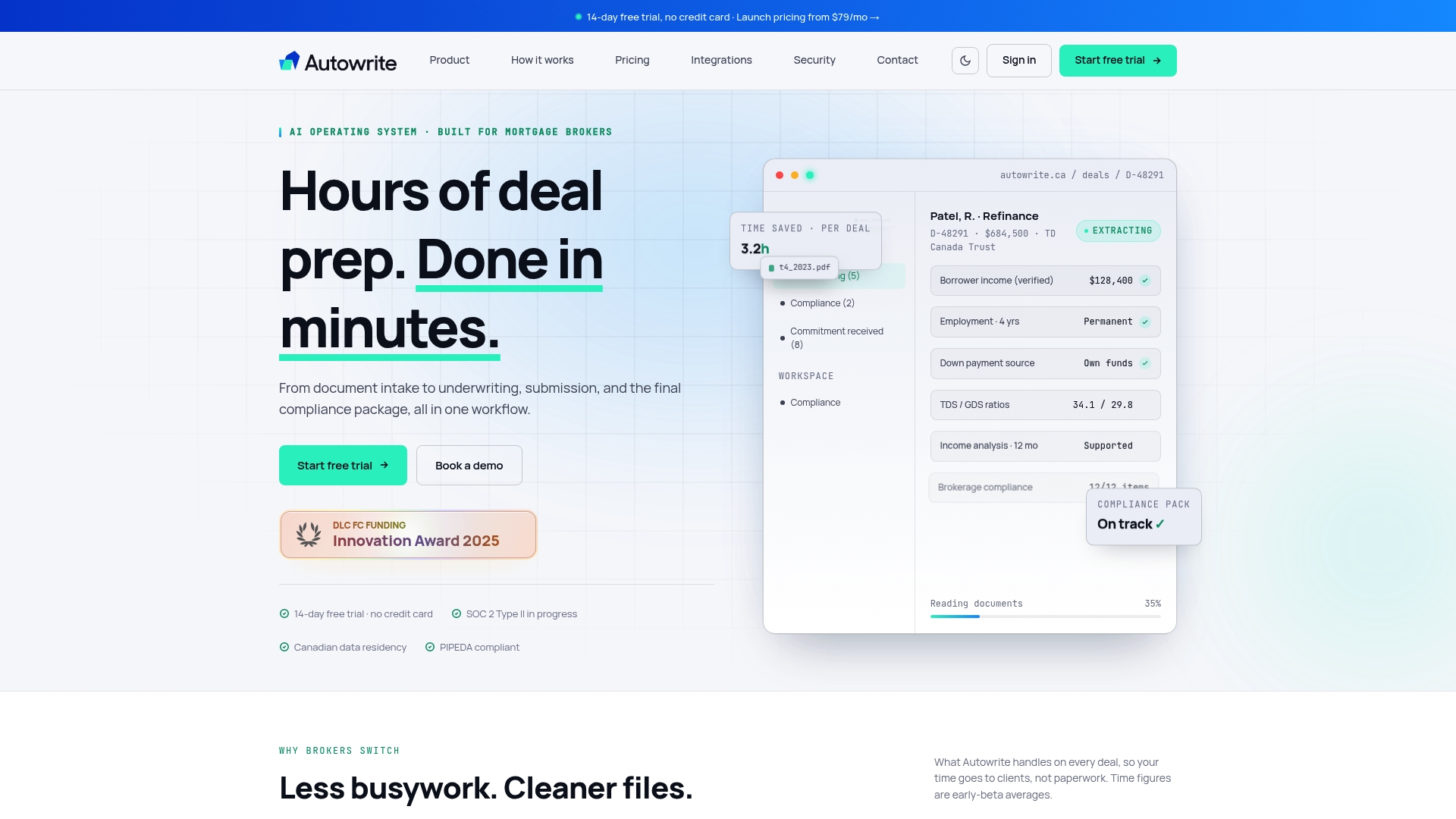
Licensed mortgage brokers, agents, and brokerage owners can start a 14-day free trial without a long-term commitment, giving your team a real chance to run your own sample files through the system before deciding on a full rollout. If you'd rather see it in action first, request a demo through the same page and bring the vendor question pack from this guide. Either way, the fastest path to knowing whether automation fits your brokerage is testing it against your own files, not another vendor's demo data.
Frequently Asked Questions
What is mortgage document automation?
Mortgage document automation is the use of AI-based intelligent document processing to classify loan documents, extract specific data fields, validate them against each other, and route only flagged exceptions to a human reviewer instead of requiring manual review of every file.
How much time does mortgage document automation actually save?
Industry reporting puts typical savings at 5 to 8 hours per loan file, with some commercial loan packages seeing processing time drop by as much as 41%. Actual savings depend heavily on document volume and how well the platform integrates with your existing LOS.
Which mortgage documents should I automate first?
Start with the documents that appear on nearly every loan file: pay stubs, W-2s, bank statements, and the 1003 loan application. These deliver the fastest measurable return because the time savings compound across your full pipeline, rather than rare or highly variable documents like foreign income statements.
Is mortgage document automation secure enough for compliance requirements?
A properly vetted platform should offer encryption at rest and in transit, SOC 2 or ISO attestations, role-based access controls, and immutable audit logs. Ask specifically about data residency if your brokerage has contractual or regulatory requirements around where borrower data is stored and processed.
How long does it take to deploy mortgage document automation?
A typical pilot runs four to six weeks, with LOS and POS integration adding another two to four weeks in parallel. Full go-live across your complete document volume usually happens three to four months after your first vendor conversation, depending on integration complexity.
This article provides general information for evaluating mortgage document automation solutions and does not constitute legal, compliance, or financial advice. Confirm specific regulatory and data residency requirements with your compliance team or a qualified professional before deployment.
This article is general information, not a substitute for advice from a qualified financial advisor. Consult a qualified financial professional about your own circumstances before acting on anything here.
Sources
These sources go deeper on specific pieces of the automation puzzle covered in this guide.
- New AI workflow cuts mortgage document processing minutes — National Mortgage Professional
- Indecomm company profile — HousingWire