
Most Canadian brokers typically pay a few thousand dollars a year for solid automation tools if they're a solo or small shop, with costs increasing substantially for larger brokerages with many seats or high loan volume. Smaller operations do best with flat subscription or per-loan pricing to keep costs predictable; larger shops tend to negotiate per-seat or enterprise deals. Before signing anything, pull two vendor quotes and run them through a basic total cost of ownership worksheet so you're comparing real numbers, not marketing decks.
TL;DR:
- Per-seat pricing is ideal for stable, high-volume brokers but becomes costly for part-time or seasonal staff; per-loan models suit unpredictable deal flow but may outpace flat subscriptions in busy years.
- Hidden costs such as integration, data migration, custom reporting, and annual escalators can significantly increase total expenses beyond initial subscription quotes.
- Total cost of ownership over three years requires accounting for setup, migration, recurring fees, and projected loan volumes, with a well-structured plan offsetting initial costs through saved staff hours.
- Cloud-based solutions typically cost less for brokerages under 25 seats due to lower infrastructure and maintenance costs, while on-premise systems involve higher upfront investments and internal management.
- Prioritize quick implementation and high-volume automation over customization for small brokers to realize faster ROI and reduce delays in workflow improvements.
Table of Contents
- How Much Does Mortgage Automation Software Cost?
- What Hidden Costs Should You Watch For?
- How Do You Calculate Total Cost of Ownership?
- What Should You Ask Vendors Before Signing?
- Licensing and Maintenance Fees Details
- How Does Customization Affect the Price?
- What Ongoing Costs Come After Go-Live?
- Cloud-Based vs On-Premise: Which Costs Less?
- Speed, Customization, or Cost: What Should You Prioritize?
- Autowrite: Built to Lower Your Total Cost of Ownership
- Sources
- FAQ
How Much Does Mortgage Automation Software Cost?
The honest answer depends entirely on which pricing model a vendor uses, and that's the first thing to nail down before comparing any numbers. Three structures dominate the market: per-seat, per-loan, and flat subscription. Each behaves differently as your brokerage grows, and picking the wrong one for your volume pattern is the fastest way to overpay.
Per-seat pricing charges a flat fee per licensed user, typically monthly. It works well when your team is stable and loan volume per agent is high, because the cost doesn't spike when a busy month hits. It gets expensive fast if you have a lot of part-time agents or seasonal staff who barely touch the software.
Per-loan pricing charges a fee for every file processed, sometimes on top of a base platform fee. This model suits brokerages with unpredictable or seasonal deal flow, since costs track activity rather than headcount. The catch: in a strong year, per-loan fees can quietly outpace what a flat subscription would have cost.
Flat subscription pricing bundles a set of features into a monthly or annual fee regardless of user count or loan volume, sometimes with a small additional charge per deal above a threshold. It's the easiest model to budget against because there's no math required each month.
Benchmark ranges reported across industry directories and LOS pricing breakdowns show a consistent pattern:
- Solo brokers and small teams: often in the low hundreds per month for entry-level platforms, scaling up as features and users increase.
- Mid-size brokerages (5 to 25 agents): typically a few thousand dollars monthly once integrations, multiple licenses, and add-on modules are factored in.
- Enterprise-scale operations and large LOS deployments: contracts frequently run into six figures annually, according to benchmark data compiled by industry directories.
Marketplace listings for mortgage software confirm that free trials and tiered subscription pricing are now standard across most vendors, which makes it easier to test a platform before committing to an annual contract.
What Hidden Costs Should You Watch For?
The quoted subscription price is rarely the full story. A detailed pricing breakdown of loan origination systems lists several cost categories that vendors routinely leave out of the headline number:
- Integration development — connecting the new platform to your existing CRM, LOS, or e-signature tools often requires custom development work billed separately.
- Data migration — moving historical client files, deal records, and compliance documents into a new system is labor-intensive and frequently underquoted.
- Per-loan fees layered on top of a subscription — some vendors advertise a flat monthly rate, then add a per-file charge once you exceed a volume threshold.
- Custom reporting — dashboards or compliance reports beyond the standard template can carry a one-time build fee.
- Training refreshers — onboarding your team once is rarely enough; expect a refresher session cost when new agents join or features change.
- Annual escalators — many contracts include automatic price increases of a fixed percentage each renewal, which compounds over a multi-year term.
For Canadian brokers, data residency is another line item that deserves attention, not an afterthought. Confirming that a vendor hosts and processes data within Canada, with clear privacy controls, matters both for regulatory comfort and for avoiding a costly replatforming project later if a vendor can't meet that requirement.
On timeline, expect a real implementation to take roughly six to eight weeks from contract signing to full go-live, covering data migration, integration testing, and staff training. Vendors that promise a go-live in a week or two are usually describing a bare-bones setup, not a fully integrated workflow.
Pro Tip: Ask every vendor for a written, itemized quote that separates the subscription fee from one-time setup costs. If a sales rep hesitates to break out migration and integration charges, treat that as a signal the final invoice will look different from the pitch.
How Do You Calculate Total Cost of Ownership?
Comparing sticker prices across vendors tells you almost nothing useful. What matters is total cost of ownership, or TCO, calculated over a realistic contract term, usually three years.
The calculation follows a simple sequence:
- List every cost component: subscription fees, per-loan charges, integration, migration, training, and any renewal escalators.
- Confirm which pricing model applies and how it scales with your projected volume.
- Project loan volume for the next 12 to 36 months based on historical trends, not best-case growth.
- Add one-time setup fees (integration, migration, initial training) as a lump sum in year one.
- Forecast recurring annual costs, including any contracted escalator percentage, across the full term.
Here's a simplified example for a small brokerage processing 200 loans a year. Suppose the platform costs $269 a month on a mid-tier plan, plus a small per-deal charge above a set volume. Add roughly $3,000 in one-year integration and migration costs, and the total first-year spend lands around $6,200. If that automation saves each agent five hours per loan file on document handling and data entry, and you value that time using a fully loaded hourly cost for processing staff (salary plus benefits and overhead, not just base wage), the time savings alone can offset the software cost within the first several months.
A Canadian case study on mortgage brokerage automation found that SaaS-based automation delivered substantial annual savings and a fast payback period when it replaced high-volume manual document work, though results vary depending on how deeply the automation is integrated into daily workflow.
Track these metrics after go-live to confirm the ROI is real: hours saved per loan file, error and rework rates, time from application to funding, and the actual per-loan cost once all fees are included. Autowrite's guide on calculating ROI from workflow automation walks through this measurement process in more detail.
What Should You Ask Vendors Before Signing?
A good vendor conversation should feel like an interrogation, not a demo. Ask directly: What is the pricing model, and how does it scale with our volume? Which integrations are included versus billed separately? Where is our data hosted, and does that meet Canadian residency expectations? What are the limits on customization before we hit additional fees? What percentage is the annual escalator, and is it capped? What are the support response times under the service agreement?
Watch for these red flags in any proposal:
- Per-loan fees mentioned verbally but absent from the written contract.
- No defined scope for data migration, which almost guarantees a change order later.
- Escalators above a few percentage points annually with no negotiated cap.
- Vague language around data residency or hosting location.
On negotiation, industry guidance on LOS procurement points to three levers that consistently work: request a pilot with a defined scope before committing to a full rollout, ask for multi-year pricing locked at a discount versus annual renewal, and push vendors to bundle implementation costs into the subscription rather than billing them separately. Above all, insist on one all-in TCO quote instead of a base price with add-ons listed elsewhere. A vendor unwilling to produce that number in writing is telling you something about how the contract will unfold.
Licensing and Maintenance Fees Details
Licensing structures in this category typically fall into two camps: a straightforward subscription license that includes maintenance and updates, or a base license fee with maintenance billed as a separate percentage, often 15% to 20% annually in traditional enterprise software arrangements. Most modern SaaS mortgage platforms have moved away from separate maintenance billing, folding updates, patches, and minor feature releases into the monthly or annual subscription instead.
That shift matters for budgeting because it removes a line item that used to catch brokerages off guard at renewal time. Still, read the contract closely. Some vendors distinguish between "maintenance" (keeping the current version running and bug-free) and "upgrades" (new major features or modules), charging separately for the latter. A platform that bundles compliance updates as part of standard maintenance is worth more than one that treats every regulatory change as a billable enhancement, especially given how often mortgage compliance requirements shift in Canada.
Ask specifically whether your license includes automatic access to new features as they ship, or whether those arrive as paid add-ons. Also confirm whether support tiers (email versus phone versus dedicated account manager) are included in the base license or sold separately, since support access often gets bundled under the maintenance umbrella in vendor marketing but priced independently in the actual contract.
How Does Customization Affect the Price?
Customization is where quoted prices diverge most sharply from what brokerages actually pay. A platform configured to match your existing workflow, branding, and reporting needs almost always costs more than the out-of-box version, and the gap can be significant depending on how much custom development is involved.
Light customization, such as adjusting form templates or dashboard views, is usually included or costs a modest one-time fee. Deeper customization, like building a custom integration with a proprietary CRM or designing compliance reports specific to your provincial regulator, requires developer time and gets billed accordingly, either as a project fee or as an ongoing addition to your subscription tier.
The practical rule: the more your brokerage's workflow deviates from a vendor's default configuration, the higher the customization bill climbs, and the longer implementation takes. Brokerages that adapt their process to fit a well-designed standard workflow, rather than forcing the software to replicate every existing habit, generally see lower costs and faster go-live.

What Ongoing Costs Come After Go-Live?
The subscription fee doesn't stop the spending. Ongoing operational costs include software updates (usually included in SaaS subscriptions but worth confirming), support access, periodic retraining as staff turn over, and any usage-based fees tied to loan volume growth.
Support quality varies enormously between tiers. Entry-level plans often include email support with a multi-day response window, while higher tiers add phone support, faster service-level agreements, and sometimes a dedicated account manager. For a brokerage where a system outage during a closing week means real financial exposure, paying for a faster support tier is usually worth the premium.
Budget for periodic training refreshers whenever new agents join or the platform pushes a significant feature update. These costs are smaller than the initial rollout but add up over a multi-year contract if ignored in the original budget.
Cloud-Based vs On-Premise: Which Costs Less?
Cloud-based mortgage automation dominates the current market, and for good reason on the cost side. Cloud platforms shift infrastructure, security patching, and server maintenance onto the vendor, which means no upfront hardware investment and predictable monthly or annual fees. Most brokerages, especially those under 25 seats, come out ahead financially with cloud deployment because the alternative requires dedicated IT staff or a costly managed-services contract just to keep servers running and compliant.

On-premise solutions still exist in the enterprise LOS space, usually where a large lender has specific data control requirements or legacy system dependencies. The upfront cost is substantially higher: server hardware, IT staffing, security infrastructure, and ongoing maintenance all fall on the brokerage rather than the vendor. On-premise deployments also take longer to implement and typically require more internal technical expertise to manage day to day.
For Canadian brokers weighing data residency requirements, cloud doesn't automatically mean a compromise. A vendor can host data entirely within Canada on cloud infrastructure while still delivering the cost advantages of a SaaS model, so the cloud versus on-premise decision and the data residency decision are separate questions worth asking independently.
Speed, Customization, or Cost: What Should You Prioritize?
If you're a small brokerage, chase fast time-to-value over deep customization every time. A platform that's live in six weeks with strong vendor support beats a heavily customized system that takes four months to configure, because every week of delay is a week of manual paperwork you're still paying for in staff time.
Feature completeness matters less than most vendor pitches suggest. The rule of thumb I'd apply: prioritize the platform that gets your highest-volume bottleneck (usually document intake and data extraction) automated fastest, then layer in customization once you've proven the ROI on that first win.
— Anant Bawa
Autowrite: Built to Lower Your Total Cost of Ownership
Autowrite is the alternative to stitching together generic document tools and manual review for Canadian mortgage brokers. It automates document intake, classification, and data extraction, then auto-fills underwriting forms and assembles e-sign and compliance packages, turning hours of paperwork into minutes rather than adding another disconnected tool to your stack.
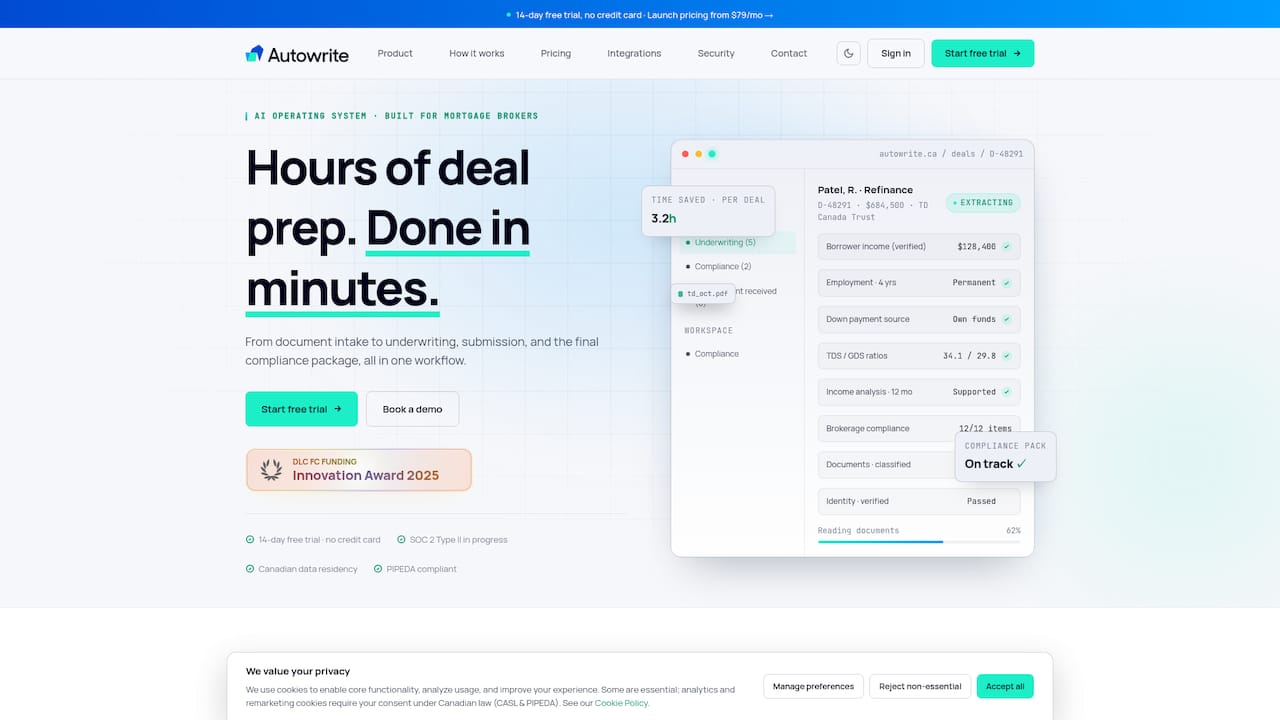
For brokers focused on shortening payback and keeping TCO predictable, that matters more than a long feature list. Autowrite's platform runs on Canadian data residency with built-in privacy compliance, so you're not budgeting for a replatforming project down the road. Plans start at a monthly subscription fee for entry-level options, with higher tiers and enterprise-level pricing available, plus additional fees per deal beyond plan limits. Tiers commonly include free trials to test the platform before subscribing. Check Autowrite's pricing page to compare plans against your loan volume and run your own TCO numbers before your next renewal decision.
This article is general information, not a substitute for advice from a qualified financial advisor. Consult a qualified financial professional about your own circumstances before acting on anything here.
Sources
- SoftwareAdvice — mortgage software listings and pricing signals
- LOS Directory — What does an LOS really cost? Pricing breakdown by lender type
- Maple AI Consultants — Mortgage brokerage AI case study
FAQ
What Is a Reasonable Monthly Budget for Mortgage Automation Software?
Solo brokers and small teams typically budget in the low hundreds per month for entry-level plans, while mid-size brokerages often spend several thousand monthly once integrations and multiple licenses are added. Autowrite's plans start at $149 a month for Starter, scaling to $269 for Pro and $499 for Legend depending on team size and feature needs.
Does Mortgage Automation Software Have Hidden Fees?
Yes. Common hidden costs include integration development, data migration, per-loan fees layered on top of a subscription, and annual price escalators, according to a detailed LOS pricing breakdown. Always request an itemized, all-in quote before signing a contract.
How Long Does Implementation Typically Take?
A realistic implementation timeline runs about six to eight weeks, covering data migration, integration testing, and staff training. Vendors promising a much faster go-live are usually describing a stripped-down setup rather than a fully integrated workflow.
Is Cloud-Based Mortgage Software Cheaper Than On-Premise?
For most brokerages under 25 seats, cloud-based software costs less overall because the vendor handles infrastructure, security, and maintenance. On-premise systems require upfront hardware and dedicated IT staff, which adds significant cost outside the software license itself.
How Do I Calculate ROI From Mortgage Automation?
Convert hours saved per loan file into dollar savings using a fully loaded hourly cost for processing staff, then compare that against your total first-year cost including setup fees. A Canadian case study found automation can deliver fast payback when it replaces high-volume manual document work, though results depend on how deeply the tool integrates into daily operations.