
Yes, a paperless mortgage brokerage is achievable now, and most of the technology exists off the shelf. The real gains show up in three places: faster file turnaround, fewer data-entry errors, and a smoother client experience. The catch is compliance. Electronic records must stay producible on demand, and some paper handoffs at closing may still be unavoidable. Start with a small pilot: intake plus e-signature on new purchase files, then expand from there.
TL;DR:
- Compliance requires electronic records to be producible within 30 days for audit purposes, which influences your document retention and backup policies.
- A fully paperless workflow involves secure client portals, intelligent data extraction, e-signatures, and integrated LOS or CRM systems with strong security standards.
- Pilot projects should focus solely on intake and e-signatures first, then gradually incorporate automation and full integration to avoid compliance issues and system fragmentation.
- Error rates and processing times are key metrics for ROI, with careful baseline measurement and conservative assumptions guiding your investment and automation efforts.
- Backup and disaster recovery plans must ensure data is stored redundantly, quickly recoverable within hours, and regularly tested to meet both compliance and operational resilience standards.
Table of Contents
- What does a paperless mortgage brokerage actually include?
- What are the legal requirements for electronic mortgage records in Canada?
- Which technologies do you actually need, and how do they connect?
- How do you roll out a paperless mortgage process step by step?
- How do you measure ROI on a paperless mortgage system?
- How does Autowrite fit into a paperless broker workflow?
- Planning for outages: backup and disaster recovery for electronic mortgage records
- What brokers actually get wrong about going paperless
- Ready to pilot a paperless workflow that holds up to compliance scrutiny.
- Where to verify the compliance details in this guide
- Sources
What does a paperless mortgage brokerage actually include?
A paperless brokerage isn't just PDFs replacing paper stacks. It's a connected system where a document enters once and flows through every stage without being retyped, re-scanned, or lost in an email thread.
The borrower experience starts with a secure intake portal, where clients upload pay stubs, T4s, and bank statements instead of emailing scans back and forth. From there, intelligent document processing reads and sorts those files automatically, pulling income figures and dates into structured data instead of leaving a broker to type them by hand. Everything lands in a document management system that functions as an e-vault, complete with timestamps and an audit trail showing who touched what and when.

E-signature tools capture consent and authorization at each step, and that signed record feeds directly into your loan origination system (LOS) or CRM, so there's one transaction record instead of five conflicting versions.
The parts that still need a human:
- Low-confidence document reads flagged for manual review before they hit the file
- Unusual income situations (self-employed, multiple properties, gig income)
- Lender-specific exceptions that don't fit a standard template
- Final compliance sign-off before submission
That human-in-the-loop layer is what separates a genuinely reliable intake workflow from a system that just automates mistakes faster.
What are the legal requirements for electronic mortgage records in Canada?
Compliance is where most brokers hesitate, and the hesitation is reasonable. Two separate rule sets govern this, and they don't always point the same direction.
FINTRAC permits electronic recordkeeping, but with a condition that shapes your entire system design: records must be producible as a paper copy within 30 days of a request. Your document management system needs to guarantee that turnaround, not just store files somewhere convenient.
Statistic Callout: FINTRAC's own guidance sets the bar at 30 days for producing a paper copy on request. That's the number your DMS and retention policy need to be built around, not a vague "we'll get to it" commitment.
Provincial practice guidance adds another layer. The Law Society's guidance on electronic registration notes that certain documents, including Standard Charge Terms, still commonly require delivery of a true copy, which lawyers often satisfy by printing and obtaining a signed acknowledgment. That means your paperless workflow needs a defined handoff point where paper reenters the picture, rather than pretending the file stays digital end to end.
To stay audit-ready, build these controls into your system from day one:
- Maintain a searchable audit log for every document touch, edit, and signature
- Write a retention policy that specifies where files live and how fast they can be pulled
- Document your standard operating procedures so any team member can produce a file on request
- Confirm with your closing lawyer where paper delivery is still expected, and design process controls accordingly, including when to engage professional notary signing services for hybrid closing steps.
Which technologies do you actually need, and how do they connect?
Buying software in the wrong order is the fastest way to end up with five disconnected tools that each solve one problem badly. Prioritize categories over individual products first.
Five categories matter most:
- Secure intake portals for client document upload, replacing email attachments
- Intelligent document processing to classify files and extract data automatically
- E-signature platforms for consent and authorization capture
- Document management / e-vault systems with audit trails and retention controls
- LOS and CRM connectors that keep everything tied to a single transaction record
Transaction management tools, distinct from a CRM, are worth a separate look too. Platforms in this category, like Paperless Pipeline, maintain checklists, deadlines, and document history in one place, often at a modest monthly cost, which makes them a reasonable entry point for smaller brokerages.
Integration architecture matters as much as any single tool. Look for API-first vendors, single sign-on, multi-factor authentication, and explicit Canadian data residency commitments. On the security side, ask every vendor about SOC 2 or ISO certification, encryption standards, and their breach response process before signing anything.
Pro Tip: The fastest way to spot future fragmentation is asking one question during a demo: "If I upload a document here, where else does it appear automatically?" If the answer involves someone re-uploading it manually, you've found your next bottleneck.
Siloed file shares and manual rekeying are what quietly kill paperless projects. A tool that's brilliant in isolation but doesn't talk to your LOS just adds a second filing system.
How do you roll out a paperless mortgage process step by step?
Sequencing matters more than speed here. Brokerages that try to digitize everything at once tend to stall on compliance questions they should have answered first.
- Review compliance requirements and align stakeholders. Get your compliance officer, closing lawyer, and lead brokers in the same conversation before buying anything.
- Run a pilot on new purchase files. Limit scope to intake and e-signature, and define success metrics up front, such as time from application to a complete file.
- Scale with document intelligence and LOS integration. Once the pilot proves out, add automated extraction to push toward straight-through processing on standard files.
- Expand to full scope. Bring in renewals, discharges, lender submissions, and backup procedures once the core workflow is stable.
- Invest in change management. Train staff on new SOPs, set clear vendor SLAs, and give the team a channel to flag friction points early.
The most common pitfalls are over-automating before compliance controls are proven and skipping the SOP documentation step because it feels like paperwork about paperwork. Ironic, but it's the piece that saves you during an audit. A narrow, measurable pilot beats a broad rollout that nobody can fully explain to a regulator six months later.
How do you measure ROI on a paperless mortgage system?
Track a small set of numbers consistently rather than a long dashboard nobody checks. The core five: processing time per file, admin hours per loan, error rate on submitted documents, time to close, and borrower satisfaction scores.
A simple ROI formula works fine to start: (admin hours saved per file × hourly cost × files per month) minus (subscription and implementation cost) equals monthly net gain. Run this with conservative assumptions, not vendor best-case numbers.
- Measure your current baseline for at least 30 days before switching anything
- Verify any vendor-quoted "before and after" figures against your own file data
- Build a monthly dashboard, not a quarterly one, while you're still in pilot phase
- Track error rate separately from speed. Fast and wrong is worse than slow and right
Statistic Callout: FINTRAC's 30-day producibility rule isn't just a compliance detail. It's also a useful internal benchmark: if your system can't retrieve a complete file faster than that requirement demands, your "paperless" process still has friction to solve.
How does Autowrite fit into a paperless broker workflow?
Autowrite automates the parts of the workflow that eat the most admin time: document intake, classification, and data extraction, feeding directly into underwriting forms and compliance packages.
- Automated document intake, classification, and extraction from borrower uploads
- Pipeline management giving brokers visibility across every active file
- Compliance packaging that assembles e-sign and audit-ready document sets
In a phased rollout, Autowrite fits naturally at the pilot and scale stages, handling the intake and extraction work that otherwise consumes broker hours. A sensible pilot scope: run it against 15 to 20 new purchase files and track admin hours per loan before and after.
Planning for outages: backup and disaster recovery for electronic mortgage records
Going paperless removes filing cabinets, but it introduces a different failure mode: what happens when a server goes down, a vendor has an outage, or a file gets corrupted during transfer? A disaster recovery plan isn't optional once paper stops being your fallback.

Start with redundancy. Records should exist in at least two separate storage locations, ideally with automated, scheduled backups rather than manual ones someone might forget. Ask every vendor storing client documents where those backups live geographically and how often they run.
Recovery time matters as much as backup frequency. If your DMS goes down for a day, how long until you can access a file a lender needs immediately? Vendors should be able to state a recovery time objective in hours, not "we'll look into it." Tie this back to the FINTRAC 30-day producibility rule: a disaster that takes your system offline for a week is a compliance risk, not just an inconvenience.
Test your recovery plan the same way you'd test a fire drill. Pick a file at random once a quarter and confirm your team can retrieve a complete, audit-ready version within your target window. If that test fails, you've found a gap before a regulator or a lender did.
Finally, document who is responsible for what during an outage. A recovery plan that lives only in one IT person's head isn't a plan. Write it down, assign backups for the backup plan, and revisit it whenever you change vendors or add a new document category to your system.
What brokers actually get wrong about going paperless
The friction I see most often isn't technical. It's brokerages buying an e-signature tool and calling the job done, then wondering why admin hours barely moved. Two things actually work: pilot one workflow before touching the rest, and build your audit trail before you need it, not after a regulator asks.
— Anant Bawa
Ready to pilot a paperless workflow that holds up to compliance scrutiny.
Autowrite is built specifically for the intake and extraction bottleneck that stalls most paperless rollouts. Rather than stitching together a generic e-signature tool, a separate document scanner, and a CRM that doesn't talk to either, Autowrite automates classification and data extraction in one system, then assembles the compliance package your file needs before it moves to underwriting.
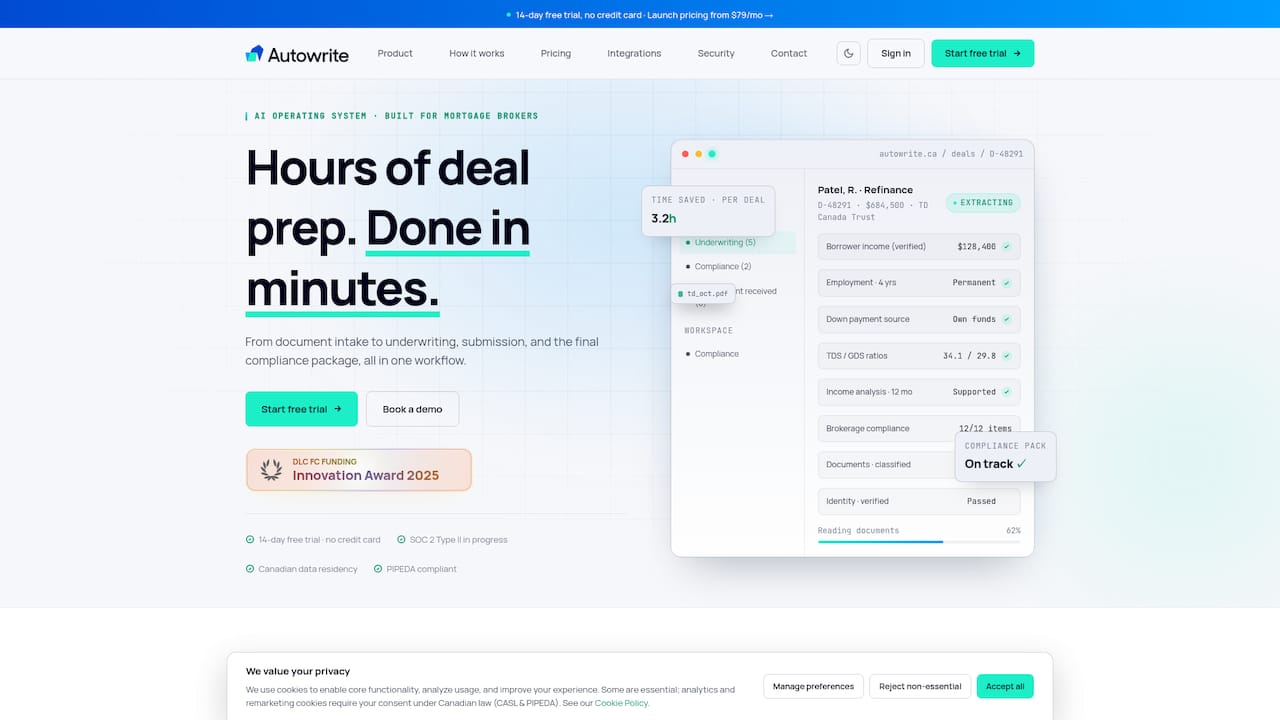
That means the pilot described earlier in this guide (15 to 20 new purchase files, tracked against admin hours and error rate) is exactly the use case Autowrite is designed to prove out fast. The platform includes a 14-day free trial, so you can measure the difference on your own files instead of taking a vendor's word for it. If you're ready to see what a real file looks like moving through the system, start a free trial with Autowrite and put your current intake process up against it.
Where to verify the compliance details in this guide
For the recordkeeping and closing rules covered above, go directly to the source: FINTRAC's recordkeeping guidance for mortgage brokers and the Law Society's electronic registration practice guidelines. When evaluating vendors, ask directly about SOC 2 or ISO certification status.
Sources
- Record keeping requirements for mortgage administrators, brokers and lenders
- Practice Guidelines for Electronic Registration of Title Documents