
For most Canadian brokerages, the fastest path into Scarlett Network runs through native modules or Zapier connectors, not custom code. Native modules cover lead management, origination, and underwriting out of the box. Zapier links your existing CRM and lead sources in hours. Reach for webhooks or a direct API build only when you need custom field mapping, document attachments, or tighter service-level guarantees, and confirm Canadian data residency and retention terms with vendor documentation before you connect anything.
TL;DR:
- Most brokerages should start with native modules or Zapier connectors, reserving custom API builds for cases with complex data mapping or attachment needs.
- Setting up integration requires early stakeholder alignment, proper authentication management, comprehensive field mapping, and thorough testing in sandbox environments before going live.
- Typical workflows include lead capture from Facebook ads, CRM two-way sync, document automation with Autowrite, and automated deal handoffs to underwriting, with each suited to different integration methods.
- Ensuring data security involves encrypting transmissions, designing idempotent endpoints, securing document uploads, and maintaining detailed logs and audit trails for compliance.
- Integration timelines vary from one to three days for Zapier, one to two weeks for native modules, and up to eight weeks for custom API development, with incremental scaling advised.
Table of Contents
- Scarlett Network Integration Methods: Native, Zapier, or API
- How Do You Set Up a Scarlett Network Integration?
- Real Scarlett Integration Workflows Brokers Actually Use
- Technical Requirements For A Secure Scarlett Connection
- Canadian Compliance and Data Residency Considerations
- What Does A Scarlett Integration Cost And Take To Build
- How Autowrite Fits Into A Scarlett-Based Workflow
- Start Small, Then Scale The Integration
- Get Your Documents Out Of The Way Before They Slow Down A Closing
- Where To Verify These Integration Details
- Sources
- FAQ
Scarlett Network Integration Methods: Native, Zapier, or API
Choosing how to connect Scarlett Network to the rest of your tech stack comes down to three real options, and each one solves a different problem.
Native modules are the path of least resistance. Scarlett Network's own platform includes Origination, Underwriting, ScarlettPay, and Lead Management built directly into the system. Scarlett's blog confirmed Lead Management went live as part of a push toward a single unified platform for brokers. If your brokerage already runs most of its pipeline inside Scarlett, turning on a native module means no third-party middleware, no extra vendor contract, and one less system to secure.
Zapier connectors solve the opposite problem: connecting Scarlett to tools it doesn't natively replace. Scarlett's Zapier app listing shows ready-made integrations with Zoho CRM, Facebook Lead Ads, Finmo, and LoanOfficer.ai. Setting one up is closer to configuring a spreadsheet than writing software. A broker with no developer on staff can have leads flowing from a Facebook ad campaign into a Scarlett deal record within an afternoon.
Webhooks and direct API access are for brokerages that have outgrown the first two options. Maybe you need to pass document attachments alongside lead data, map twelve custom fields instead of the four Zapier exposes, or guarantee a response time your compliance team can put in a service agreement. That's a developer-led build, and it takes weeks, not hours.
Here's how the three stack up:
- Native modules: fastest to activate, zero extra cost beyond your Scarlett subscription, but limited to what Scarlett itself has built.
- Zapier: fast to configure (hours to days), low technical barrier, works well for standard fields, but can hit ceilings on complex data or high volume.
- Webhooks/API: highest setup cost and longest timeline, but full control over data mapping, attachments, and error handling.
Most brokerages should try the cheapest option first and only escalate when it genuinely can't do the job.
How Do You Set Up a Scarlett Network Integration?
A working integration isn't a single afternoon task. It's a short project with a beginning, middle, and end, and skipping steps is exactly how brokers end up with duplicate leads or missing documents six weeks in.
-
Line up your stakeholders first. Get your broker admin, whoever manages compliance, and (if you're going beyond Zapier) a developer or IT contact in the same conversation before you touch any settings. Map out which data fields actually need to move between systems, and flag anything with privacy or AML/KYC implications early.
-
Handle authentication properly. Native modules and Zapier typically use simple API key or OAuth-based logins inside the Scarlett interface. Custom API builds usually require OAuth tokens with defined scopes. Store credentials in a secrets manager or your password vault, never in a shared spreadsheet or a Slack message.
-
Map your fields before you map anything else. List every required field (name, phone, loan amount, lead source) and every optional one your workflow depends on (referral source, property type, notes). Decide how attachments, like ID documents or income statements, will be handled. This step is where most integration headaches start, because a missed field mapping doesn't throw an error. It just silently drops data.
-
Test in a sandbox, not production. Use a test account or Scarlett's sandbox environment if one is available for your plan, and send sample payloads that mirror real lead and deal data, including edge cases like a lead with no phone number or a deal with multiple borrowers. Replay a handful of webhook events to confirm the system handles retries without creating duplicate deals.
-
Go live with a rollback plan. Cut over during a low-volume period, monitor the first batch of real leads closely, and know exactly how to pause the integration if something breaks.
Pro Tip: Run your test payloads with intentionally messy data, a missing email, a foreign phone format, a duplicate submission, before you go live. Real leads will send you exactly that mess eventually, and you want to find out how Scarlett handles it on a Tuesday afternoon, not during a closing.
Real Scarlett Integration Workflows Brokers Actually Use
Most integration projects aren't abstract. They map to four workflows that show up in nearly every Canadian brokerage.
- Lead capture from Facebook Lead Ads. A prospect fills out a Facebook form, Zapier catches the submission, and a new deal gets created and assigned to an agent in Scarlett within seconds. No one on your team touches a spreadsheet.
- Two-way CRM sync. Contact details and pipeline stage updates flow both directions between your CRM (often Zoho CRM, per Scarlett's own Zapier integration list) and Scarlett, so an agent working in either system sees the same current status.
- Document intake automation. This is where a document intelligence layer earns its place. A tool like Autowrite can capture incoming documents, classify them, extract the relevant fields, and post structured data straight into Scarlett rather than leaving an agent to retype numbers off a pay stub.
- Underwriting handoff. Once a deal hits a defined stage, income, down payment, and property details, an automated trigger moves it to underwriting with fields already populated, instead of an agent re-entering the same information a second time.
Each of these workflows can run on Zapier alone, but document intake and underwriting handoff tend to benefit most from a purpose-built connection, because the data involved is messier than a name and a phone number. A lead form has four fields. A mortgage application has forty, spread across a dozen documents.
Technical Requirements For A Secure Scarlett Connection
Getting the workflow right matters less if the connection itself is loose. A few technical practices separate a stable integration from one that quietly leaks data or breaks under load.
- Encrypt everything in transit. Use HTTPS with TLS 1.2 or higher for every API call, and use signed webhook payloads wherever Scarlett or your middleware supports them, so you can verify a request actually came from a trusted source.
- Build idempotent endpoints. Design your integration so it can safely receive the same webhook event twice without creating two deals. Retries happen more often than most teams expect, especially over unstable connections.
- Route attachments through secure upload endpoints. Documents like income verification or ID scans should move through presigned upload URLs or a dedicated secure file storage endpoint, never as raw attachments in a generic webhook payload.
- Log everything and alert on failure spikes. Keep persistent logs of every integration event and set up alerting when failure rates climb, so a broken connector gets caught in hours, not weeks.
- Keep audit trails for every automated action. Compliance and dispute resolution both depend on being able to show exactly what data moved, when, and through which system.
For brokerages running high transaction volumes across multiple systems, the same hub-and-spoke connectivity patterns used by enterprise cloud providers for hybrid networking apply conceptually here: centralize your integration logic in one place rather than wiring every tool directly to every other tool. It's easier to secure one hub than a dozen point-to-point connections.
Canadian Compliance and Data Residency Considerations
Every integration decision in a Canadian brokerage eventually runs into a compliance question, and it's worth answering those before you sign anything.
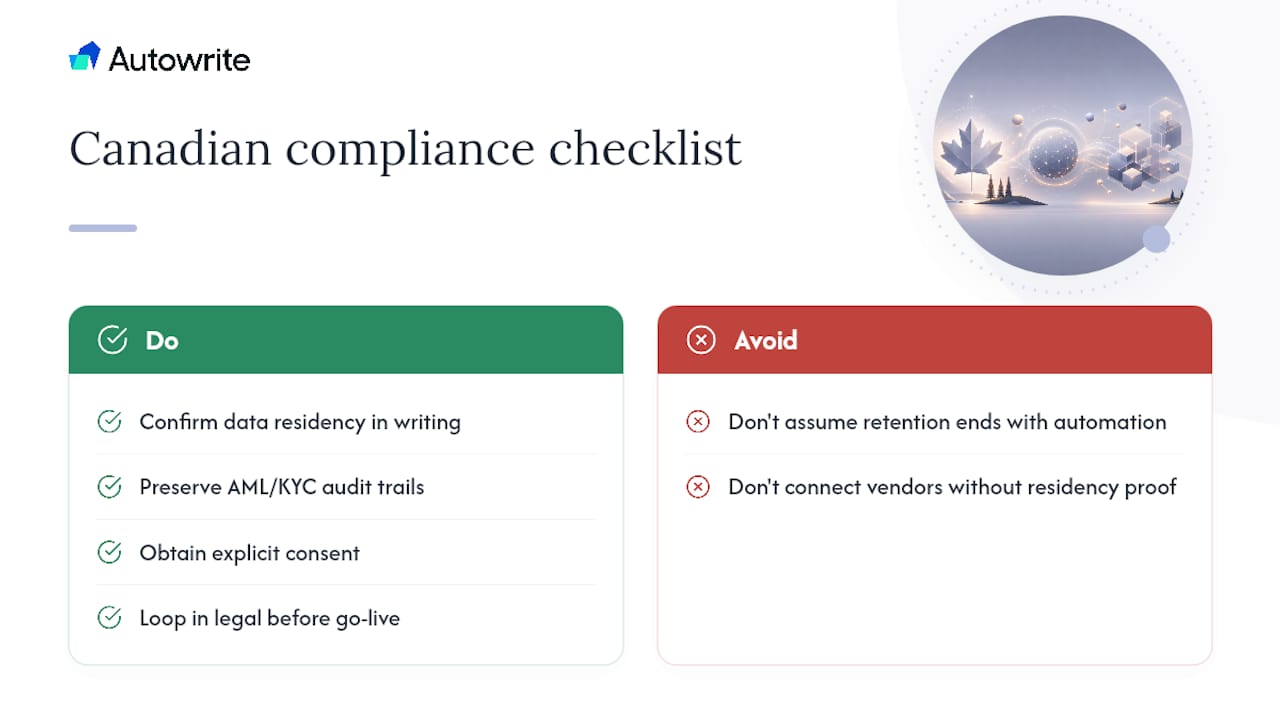
Confirm where your data actually lives. If your brokerage policy or provincial regulator requires Canadian data storage, get that commitment in writing from any vendor or middleware provider before you connect systems, not after. Native Scarlett modules generally simplify this, since keeping workflows inside one Canadian-built platform avoids scattering client data across multiple third-party servers.
Retention matters as much as location. AML and KYC recordkeeping obligations don't disappear because a document moved through an automated pipeline. Your intake process, however it's built, needs to preserve the same audit trail a manual process would.
Consent needs to be explicit, too. If a lead's information flows automatically from a Facebook form through Zapier into Scarlett, that lead should know their data is being processed that way. The same applies to automated document intake tools handling sensitive financial records.
When a provincial rule or an unusual data flow raises a question you can't answer confidently, that's the moment to loop in legal or compliance, before the integration goes live rather than after a regulator asks.
What Does A Scarlett Integration Cost And Take To Build
Timelines vary a lot depending on which of the three approaches you pick, and pretending otherwise sets up bad expectations with your team.
- Zapier connector: typically 1 to 3 business days, mostly configuration and testing.
- Enabling a native module: usually 1 to 2 weeks, depending on how much data needs to be migrated or reconciled.
- Custom API integration: 2 to 8 weeks, depending on field complexity, attachment handling, and how much testing your compliance team requires.
Get the right people in the room early: your broker admin who understands the actual workflow, an IT or developer resource if you're going past Zapier, your compliance lead, and Scarlett's own support team or an implementation partner if one is involved.
Cost drivers break down into a few buckets: developer hours for custom work, a Zapier subscription tier if your volume exceeds the free plan, document OCR or storage costs if you're automating intake, and any vendor implementation fees Scarlett or a partner charges. Before committing, ask for a defined support SLA, response time commitments, and a clear escalation path if the integration goes down during business hours.
How Autowrite Fits Into A Scarlett-Based Workflow
Most integration effort in a mortgage brokerage isn't about moving lead data. It's about moving documents, and that's a harder problem than a Zapier trigger solves on its own.
Autowrite handles the document side specifically: automated classification of incoming files, line-level data extraction from pay stubs, bank statements, and ID documents, and auto-filling of underwriting fields that would otherwise take an agent twenty minutes per file. It runs on Canadian data residency by design, which matters for the same compliance reasons covered above.
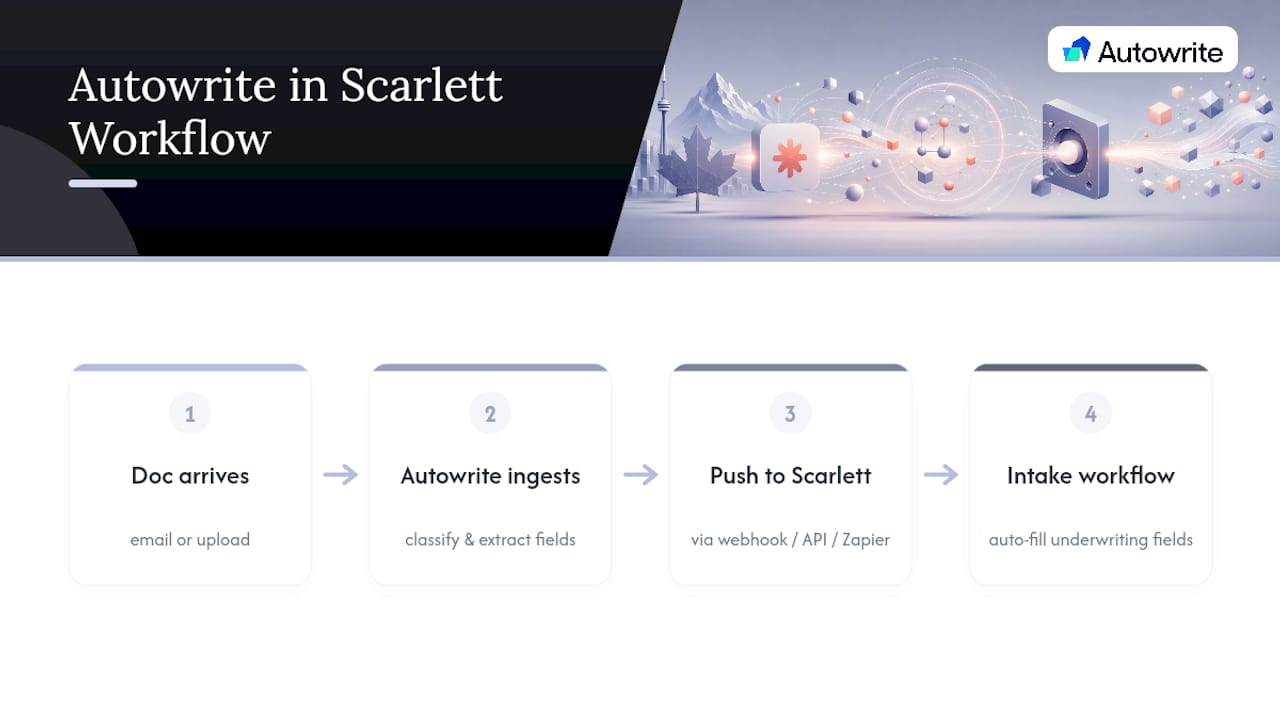
The typical pattern looks like this: a document arrives, Autowrite ingests it and extracts the structured fields, and that data pushes into Scarlett through a webhook, direct API call, or a Zapier step, depending on which integration path your brokerage already has running. It slots into the document intake workflow rather than replacing it.
The outcome brokers report centers on turnaround time and error reduction: fewer manually retyped numbers, faster movement from application to underwriting, and compliance packages assembled without someone building them by hand. Brokerage size typically influences plan selection, and all plans include a 14-day free trial.
Pro Tip: If you're already running Scarlett's Lead Management module, connect Autowrite to the document intake step first before touching anything else. It's the single highest-friction manual task in most pipelines, and fixing it first shows results before you invest in a bigger integration project.
Start Small, Then Scale The Integration
The biggest mistake brokerages make with Scarlett integrations is trying to build the whole pipeline before proving any piece of it works. Pick one lead source, wire it end to end, native module or Zapier, and run it for a few weeks before touching a second connector.
That sequencing matters because it forces you to validate business rules, like how leads get assigned or which fields are mandatory, before you've sunk real development hours into a custom API build. Monitoring, deduplication, and consent capture should be built in from day one, not bolted on after your first duplicate-lead incident. Budget for incremental improvements over several months rather than treating this as a single launch event. The brokerages that get the most out of Scarlett Network typically didn't get everything right on day one. They just made fixing things cheap.
— Anant Bawa
Get Your Documents Out Of The Way Before They Slow Down A Closing
Autowrite is an alternative to hiring extra admin staff for document processing: it transforms hours of manual data entry into minutes, without adding headcount or a long-term contract. If your brokerage is connecting Scarlett Network to lead sources and CRMs, the piece still missing from most setups is the document side, the pay stubs, bank statements, and income letters that someone has to read and retype by hand.
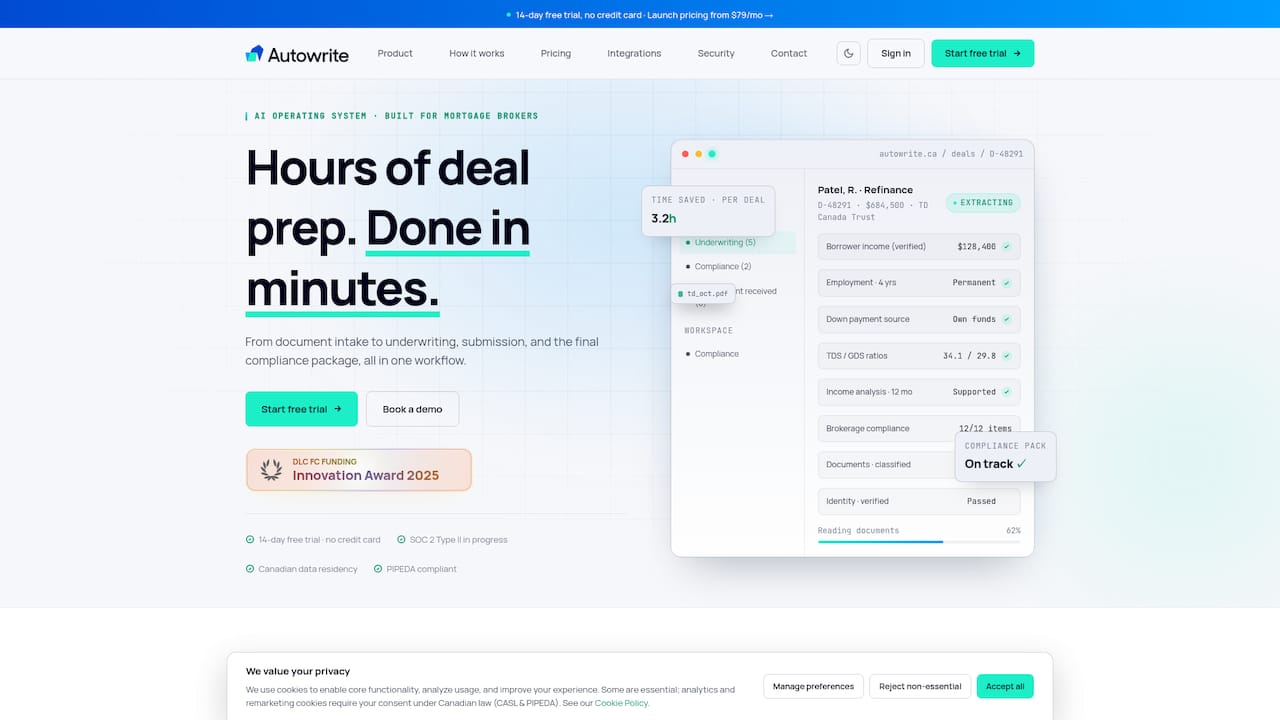
Autowrite classifies incoming documents, extracts the numbers with line-level accuracy, and pushes structured data into your workflow so agents spend their time on clients instead of PDFs. It's built for Canadian data residency and fits alongside whatever Scarlett integration path you've already chosen, whether that's a native module, a Zapier connector, or a custom API build. Plans run from Starter to Enterprise, and every tier starts with a 14-day free trial. Check current pricing and plan details to find the tier that matches your deal volume, or visit the Autowrite product page to request a walkthrough of how it connects to your existing pipeline.
Where To Verify These Integration Details
Vendor documentation changes faster than any single article can track, so confirm specifics directly before you build. Scarlett Network's product pages describe current native modules, and its Lead Management announcement covers what that module includes today. Zapier's Scarlett Network integration page lists live connectors, and Autowrite's product and pricing pages outline current plans and trial terms.
Sources
FAQ
Is Zapier The Easiest Way To Connect Scarlett Network?
For most standard lead sources and CRMs, yes. Scarlett's Zapier app listing shows working connectors for Zoho CRM, Facebook Lead Ads, Finmo, and LoanOfficer.ai that require no developer resources to configure.
What Are People Saying About Scarlett Network?
Scarlett Network positions itself as a unified platform for Canadian brokers, and its own announcement of Lead Management going live frames that module as a step toward consolidating origination, underwriting, and lead handling in one system. Broker feedback on any platform varies by brokerage size and workflow, so it's worth testing native modules against your own pipeline before fully committing.
Who Are The Best Mortgage Technology Providers In Canada?
There's no single "best" provider; the right fit depends on whether a brokerage needs origination software, lead management, or document automation. Scarlett Network covers origination, underwriting, and lead management natively, while a tool like Autowrite complements that stack by automating document intake and data extraction for Canadian brokers.
How Much Does Autowrite Cost To Integrate With Scarlett?
Autowrite's plans start at $149 per month for Starter, with Pro at $269 per month and Legend at $499 per month, plus a $20 fee per additional deal beyond plan limits. Enterprise pricing is available on request, and every plan includes a 14-day free trial.
Do I Need A Developer To Build A Scarlett Integration?
Not for native modules or Zapier connectors, both of which are designed for non-technical setup. You'll need developer or IT support only if you're building a custom webhook or direct API integration for advanced field mapping or attachment handling.