
Switching mortgage software works when you treat it as a managed project, not a weekend upgrade: map your data before you sign anything, test the move on real files, run a pilot, then cut over with the old system frozen and readable in the background. The three things that sink migrations are data that degrades in transit, integrations that quietly stop talking to each other, and staff who revert to their old habits the first stressful week. A document intelligence approach that turns hours of manual data entry into a matter of minutes is the kind of automation-first foundation that makes this transition worth the effort.
TL;DR:
- Successful mortgage software migration requires thorough planning, including data mapping, testing, and staged phases to avoid unexpected failures.
- Brokers should verify data export formats, integration support, and support timelines explicitly in writing before signing contracts.
- During migration, keep the old system in read-only mode and conduct test migrations to detect silent data issues, especially with timestamps and document links.
- Staff training must be role-specific, with clear acceptance criteria and low-volume timing to ensure adoption and minimize errors.
- Tracking key KPIs like time to close and staff usage post-migration validates success, but firms often fail by neglecting to prepare for productivity dips.
Table of Contents
- What Should You Check Before Signing a New Mortgage Software Contract?
- How Do You Plan a Phased Migration to New Mortgage Management Tools?
- What Data Should You Map and Validate Before You Migrate?
- How Do You Train Staff and Run a Successful Cutover?
- Which KPIs Prove the Migration Actually Worked?
- What Brokers Get Wrong About Switching Mortgage Software
- Why Autowrite Fits a Migration Built Around Automation
- Sources
- FAQ
What Should You Check Before Signing a New Mortgage Software Contract?
Before you sign anything, run the numbers. Estimate what implementation will actually cost, how many admin hours you expect to save each week, and how much faster you think your average deal will close once the new mortgage application software is live. Vague projections here come back to bite you in month four, when a partner asks whether this was worth it.
A typical loan origination system migration runs four to eight months and can cost $75,000 to $300,000 beyond licensing fees. Budget for that dip. Do not schedule your busiest closing season around it.
Ask every vendor you're evaluating these four questions before signing:
- What format does our data export in, and does the new platform ingest it without a third-party conversion tool?
- What migration services are included in the contract, versus billed separately as professional services?
- What are the API and integration commitments for your existing CRM, e-signature tool, and lender connections?
- What's the implementation timeline, and what SLA governs support response during the first 90 days?
Getting these answers in writing matters more than most brokers realize. Vague verbal promises about migration scope and integration support tend to slip once a contract is signed, and slippage on a migration timeline costs real money.
Internally, name an executive sponsor and a project owner before you talk to a single vendor demo. Identify two or three power users, usually your best administrators or agents, who will become internal champions once training starts.
Pro Tip: Ask the vendor to run a live demonstration using one of your own representative case files, not a generic sample loan. Watching how the software handles your actual complexity, from stacked income documents to unusual down payment sources, tells you far more than a polished sales script.
How Do You Plan a Phased Migration to New Mortgage Management Tools?
Skipping phases is the single biggest reason mortgage software comparison projects go sideways. Building the switch in stages, each with its own acceptance criteria, keeps a bad surprise in one phase from wrecking the whole timeline.
- Discovery and audit (weeks 1 to 3). Document every integration your brokerage currently relies on, from lender portals to e-signature tools to your CRM. Auditing SDK dependencies and connector types early avoids the last-minute discovery that a critical link has no API equivalent on the new platform.
- Data mapping (weeks 2 to 4, overlapping discovery). Build a field-by-field map between your old system and the new one, covering custom fields, case stages, and consent records.
- Test migration (weeks 4 to 6). Move a sample set of files into a sandbox environment, not production. Agreeing on a data map and testing a representative sample before the full migration is the step most brokerages skip when they're in a hurry, and it's the one that catches the most problems.
- Pilot (weeks 6 to 9). Run a small group of live, representative cases through the new system end to end.
- Parallel run (weeks 8 to 12). Process identical files in both systems and compare disclosures, compliance calculations, and reports side by side. Parallel running for 30 to 90 days gives you a real comparison instead of a guess.
- Cutover (week 12 or later, depending on volume).
- Stabilization (30 to 90 days post cutover).
For brokerages running more complex operations, organizing the plan against a 12, 9, and 6 month countdown keeps every stakeholder pointed at the same milestones, even if your actual project compresses that timeline.
Two mitigations pay for themselves repeatedly: test every integration in the discovery phase, not the pilot phase, and keep the old system in read-only mode during the overlap window so nobody accidentally updates two records in two places.

What Data Should You Map and Validate Before You Migrate?
Data migration is where most switches quietly fail, and it rarely fails loudly. Files migrate, timestamps drift, document links break, and nobody notices until an audit six months later asks for a paper trail that no longer lines up.
Build your field-level mapping checklist around these categories:
- Borrower and co-borrower names, addresses, and contact records
- Case stage and pipeline status labels (these rarely match one-to-one between platforms)
- Consent and disclosure records with their original signing timestamps
- Notes, internal flags, and any custom fields your brokerage built over the years
- Document links, including which file attaches to which case and stage
Before you migrate anything, clean it. Remove duplicate borrower records and archive documents you no longer need to keep active, in line with your retention obligations, rather than dragging every stale file into the new mortgage management tools.
One migration failure mode brokers consistently underestimate: documents transfer, but their metadata, timestamps, or audit-trail sequencing quietly falls apart in the process. The file looks fine until a compliance reviewer asks when a disclosure was actually signed, and the new system's timestamp doesn't match reality. Build a specific check for this into your test migration, not just a check that the document exists.
Once the test batch runs, reconcile it properly. Agreeing a data map and reconciling record totals after the test migration is the validation step that catches silent data loss before it becomes a compliance problem. Count records on both sides, verify a sample of document links open the correct file, and confirm audit-trail sequencing holds up under scrutiny. Data governance around what actually leaves your existing system during this process deserves its own scrutiny, and understanding what data flows where when tools touch your files is worth a conversation with whoever owns your compliance program.
How Do You Train Staff and Run a Successful Cutover?
Training that treats every role the same way wastes everyone's time. Agents need speed on the tasks they touch daily; administrators need depth on data entry and document handling; compliance staff need certainty that audit trails hold up. Build separate quick-reference guides for each group's top five tasks rather than one generic manual nobody reads past page three.
- Scope your pilot narrowly. Pick five to ten representative cases that cover your typical complexity, not just the easy files. Role-based pilots involving advisers, administrators, and compliance staff generate stronger adoption than a single generic walkthrough for the whole office.
- Set acceptance criteria upfront. Define what "the pilot passed" actually means before you start it, not after.
- Time the cutover for a low-volume week. Freeze the old system as read-only the moment cutover begins.
- Communicate early and often. Send staff a short template explaining what changes, when, and who to ask.
- Reconcile in-flight cases by hand if they straddle the cutover date, rather than trusting an automated sync to catch every edge case.
Pro Tip: Vendors that offer role-based training, live phone support, and short how-to videos ease adoption noticeably more than a single onboarding webinar. Ask about support depth before you sign, not after your team is stuck.
Which KPIs Prove the Migration Actually Worked?
Track five numbers from day one: average time from intake to submission, documents processed per case, error and exception rate, time-to-close, and how many staff members are actually using the new mortgage software reviews positively versus quietly working around it.
When something breaks, triage before you panic. Ask whether it's a quick configuration fix, an issue that needs vendor escalation, or a sign your process itself needs to change. Keep the old system accessible in read-only mode for a sustained stretch after cutover, especially for compliance-heavy files. Don't decommission it just because the new platform is live.
- 30-day checkpoint: review error rates and staff adoption; fix configuration issues fast.
- 90-day checkpoint: compare time-to-close against your pre-migration baseline.
- 180-day checkpoint: confirm the productivity dip has fully reversed and calculate realized ROI.
What Brokers Get Wrong About Switching Mortgage Software
The mistake I see most often isn't technical. It's assuming a clean data migration equals a successful switch. It doesn't. The firms that come out ahead plan for the productivity dip instead of denying it exists, and they win the adoption battle before they win the data battle. Prioritize automations that kill the most repetitive admin task first, whether that's document sorting or data entry, because that's the win your team feels in week one. Platforms built around document intelligence earn goodwill fast precisely because the payoff is immediate and visible.
— Anant Bawa
Why Autowrite Fits a Migration Built Around Automation
If you're switching mortgage software specifically because your current setup drowns you in manual document work, some platforms solve the actual bottleneck rather than just relocating it to a new interface. Such platforms automate document intake, classification, and data extraction, auto-fill underwriting forms, and assemble e-sign and compliance packages, while keeping data residency intact for brokers' records.
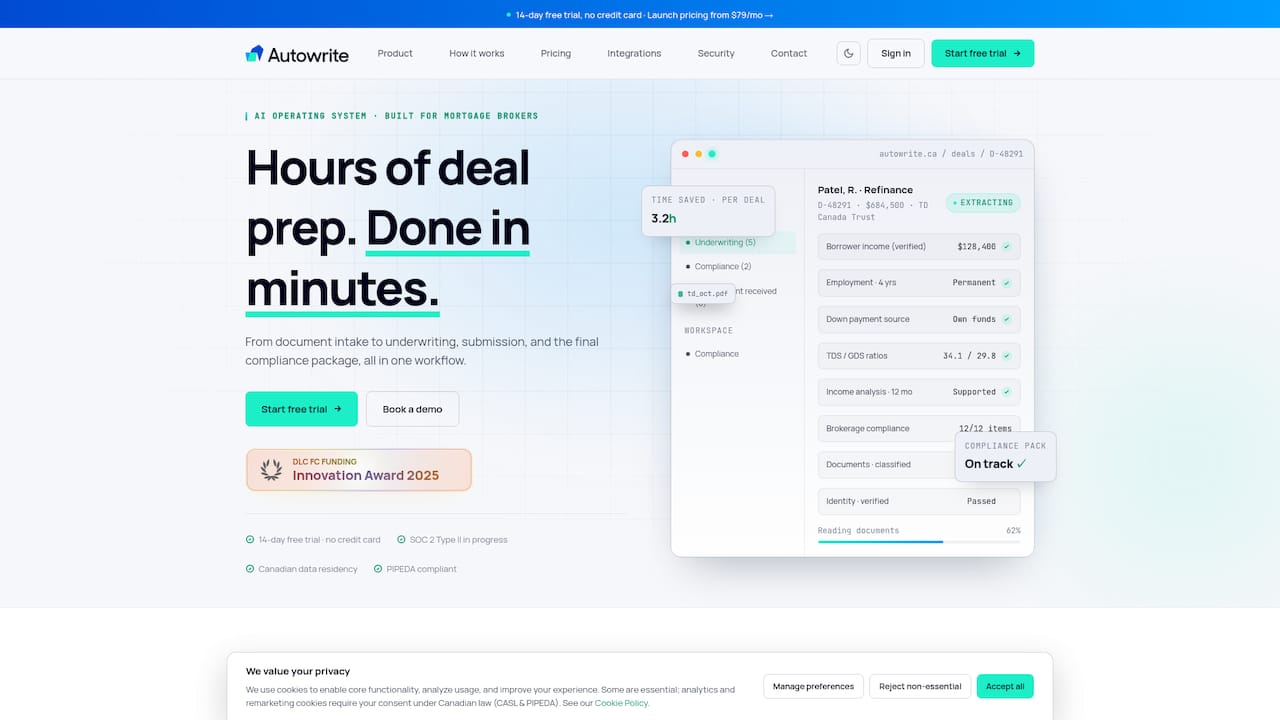
The smartest way to evaluate it during a migration is exactly the proof-path this playbook describes: run a representative-case import into a sandbox, confirm the audit trail survives intact, and use the platform's pipeline management tools to see how your team's actual case load behaves under the new system. Pair that with a look at how document automation cuts the paperwork load your staff currently absorbs by hand. Autowrite offers a 14-day free trial built for exactly this kind of hands-on test. Start it at Autowrite and see what your own files look like running through it before you commit to anything.
Sources
- Planning A Smooth Move to New Mortgage Broker Software – Yorkshire Connected
- Switching LOS: Migration guide — The LOS Directory
- Mortgage LOS Change Management: The Ultimate Checklist — MeridianLink
FAQ
How Long Does Switching Mortgage Software Usually Take?
Most loan origination system migrations take four to eight months from decision to full cutover, though a phased pilot and parallel run can compress that for smaller brokerages with fewer integrations.
Will We Lose Access to Old Case Files During the Switch?
No, as long as you plan for it. Keep the old system in read-only mode after cutover rather than decommissioning it, so staff can still reference historical files during reconciliation and compliance reviews.
How Do We Test a Migration Without Risking Live Data?
Run the test migration in a sandbox environment using a representative sample of real cases, then reconcile record counts and document links before touching production data.
What's the Biggest Risk During a Mortgage Software Migration?
Silent data degradation, where documents transfer but lose timestamps or audit-trail sequencing, tends to cause more compliance headaches than an outright migration failure, because nobody notices until an audit asks for proof.
Does Autowrite Help With the Migration Itself?
Autowrite's document classification and data extraction reduce the manual reentry work that usually slows a migration down, and its sandbox-friendly trial lets brokers test representative cases before committing to a full switch.