
Autofill underwriting forms use document-intelligence software to pull borrower data straight from tax slips, pay stubs, and bank statements, then populate lender underwriting fields automatically. For brokers, the main payoff is fewer hours spent retyping numbers and faster, underwriter-ready submission packages. Platforms built specifically for mortgage brokers, including Autowrite, apply this approach to the paperwork brokers handle every day.
TL;DR:
- Map extracted values to current versions of multiple lender forms; a single lender template can create more cleanup than the data entry it replaces.
- Gig and rental income files often require multiple years of Notices of Assessment or lease records, rather than a single pay stub.
- Require consent capture, limited data collection, independently validated models, and exportable, timestamped audit trails to meet privacy, underwriting, and recordkeeping duties.
- Pilot across real files and common lender types, route fields with low confidence to human review, and compare outputs with manual processing before rollout.
Table of Contents
- What counts as autofill underwriting forms (and what doesn't)
- Which documents and data points underwriters actually need
- How the autofill process works from intake to output
- Compliance and privacy controls you must require
- Implementation checklist: piloting autofill in your brokerage
- Why automation is a priority for brokers right now
- Autowrite: putting autofill underwriting forms into practice
- FAQ
- Sources
What counts as autofill underwriting forms (and what doesn't)
When we talk about autofill underwriting forms in this context, we mean broker-grade automation: software trained to read mortgage documents and fill lender-specific underwriting fields with verified data. This is a different category from generic browser autofill or spreadsheet form-fill tools built for everyday web forms. Those tools remember passwords and addresses; they are not built to parse a Notice of Assessment or route a self-employment income exception to a human reviewer.
Broker-grade autofill typically targets income lines, employment details, property and appraisal figures, and disclosure fields across several lender templates at once. Because every lender formats its underwriting forms differently, the software needs to recognize multiple form versions and map the same extracted data point (say, net income) to the correct field on each one. A system that only works with a single lender's layout creates more manual cleanup than it saves, which is why field mapping and version control matter as much as the extraction itself.

Which documents and data points underwriters actually need
Underwriters lean on a specific set of primary documents, and automation is only useful if it extracts the right fields from each one:
- Notice of Assessment (NOA): supplies historical income lines underwriters use to confirm trends over time.
- T4 slips: confirm employment income reported to the employer and the Canada Revenue Agency.
- Pay stubs: provide year-to-date earnings and deduction details for current income verification.
- Bank statements: show liquidity and the source of down payment funds.
- Appraisal reports: establish property value for loan-to-value calculations.
Regulators have been explicit that this data needs to be independently verifiable, not just self-reported. A CRA mortgage industry consultation found that participants want numeric income breakdowns, such as total, net, and taxable income lines, delivered through secure, consented access to CRA documents rather than a simple yes or no validation. Self-employment, gig income, and rental income all need extra handling since they rely on multiple years of NOAs or lease documentation rather than a single pay stub.
Mortgage brokers who read guidance on gig income files know that two years of NOAs often substitutes for traditional pay stubs entirely, which changes what the extraction software needs to prioritize.
How the autofill process works from intake to output
The workflow behind autofill underwriting forms generally follows five stages, with human review built into the middle rather than bolted on at the end.
- Intake: documents arrive through secure uploads, e-signature platforms, or protected fax and email channels, with borrower consent captured at this first step.
- Extraction: optical character recognition combined with intelligent data extraction reads each document and assigns a confidence score to every extracted field.
- Mapping: extracted values are matched to the correct fields on the applicable lender's current form template.
- Verification: lower-confidence fields and certain data types are cross-checked against CRA documents, employer confirmation, or credit reports, with exceptions routed to a person for review.
- Output: the system produces populated form PDFs, a packaged lender submission, and an audit trail that can be exported on request.
Extraction quality varies by document type and image clarity, which is why confidence scoring at the line level matters more than a single accuracy figure for the whole document. A system that flags a blurry pay stub field for review, instead of guessing, saves more rework than one that claims higher raw accuracy but fails silently. Reviewing how OCR performs on mortgage documents before full rollout gives you a realistic sense of where manual checks will still be necessary.
Pro Tip: Set a confidence threshold below which a field always routes to manual review, rather than trusting extraction on every document type equally.
Compliance and privacy controls you must require
Automation does not remove a broker's recordkeeping and privacy obligations, it just changes where those controls need to live in the software.
- Retention and production: FINTRAC recordkeeping guidance requires brokers to maintain complete, accurate records and produce them within regulatory timelines, so any autofill platform needs exportable, time-stamped audit trails.
- Consent and minimal collection: an audit of mortgage brokers by the Office of the Privacy Commissioner found inconsistent privacy policies and recommended limiting unnecessary collection, such as Social Insurance Numbers, along with stronger documented consent.
- Model validation: the OSFI residential mortgage underwriting guideline calls for independent validation and ongoing monitoring of models that contribute to underwriting decisions.
The practical guardrail here is simple: structured data is not the same as verified data. Extraction without a verification step against an external source still leaves an underwriter revalidating every field by hand, which defeats the purpose of automating in the first place.
Implementation checklist: piloting autofill in your brokerage
Rolling out autofill underwriting forms works best as a staged process rather than a single switch-over.
- Pre-deployment: map your top lender forms, pull a sample set of real files, and confirm your consent wording and retention rules align with FINTRAC and FSRA retention requirements.
- Integration: connect your intake sources (upload portal, e-sign, secure fax), configure lender templates, and run mapping tests against real sample files before going live.
- Validation rules: set confidence thresholds for automatic approval versus human review, and build a feedback loop so extraction improves from corrected exceptions.
- Security and retention: enable encryption, role-based access limited to staff who need the data, and exportable, audit-ready records your team can produce on short notice.
- Operations: train staff on the new workflow, update your standard operating procedures, run a staged pilot on a subset of files, and track time-per-file and error rates before full rollout.
A pilot covering a broad mix of real sample files across your most common lender types, with tracked metrics on extraction confidence and exception rate, gives you the data to tune thresholds before trusting the system on every file that comes through the door.
Pro Tip: Run your pilot in parallel with your existing manual process for the first batch of files, so you can compare outputs line by line before retiring the old workflow.
Why automation is a priority for brokers right now
The brokers who benefit most from autofill are the ones drowning in repetitive data entry on every file, not the ones chasing a novelty. When extraction, mapping, and verification are built correctly, the time saved compounds across a pipeline of active files and shows up directly in faster submissions and more closed deals. Automation only earns its place when it is paired with the compliance and consent controls outlined above. Done that way, it is a productivity measure, not a shortcut around what underwriters still require.
— Anant Bawa
Autowrite: putting autofill underwriting forms into practice
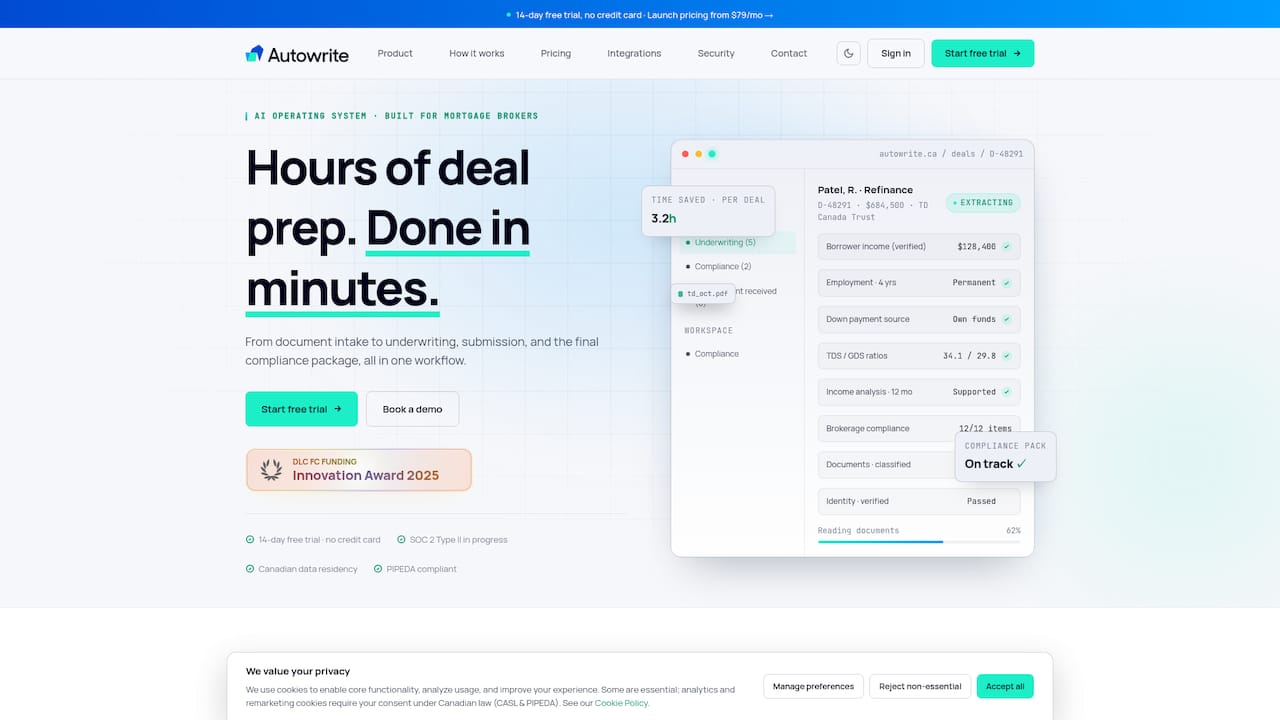
We built Autowrite specifically for Canadian mortgage brokers who need their underwriting paperwork handled without sacrificing compliance. Our platform covers the full workflow described above in one place:
- Document intake from uploads, e-signature, and secure channels, with consent captured at the start.
- Line-level confidence scoring on every extracted field, so you know exactly what needs a second look.
- Native lender template mapping and automated compliance package assembly for submission.
- Canadian data residency and audit-ready export, matching the recordkeeping standards brokers are held to.
We cover this in more detail in our guide on producing compliant, underwriter-ready autofill packages, and our checklist of core underwriting documents maps directly onto the implementation steps above. Plans start with Starter at $149 per month, with Pro and Legend tiers available as your file volume grows, plus a $20 one-off fee per additional deal. Every plan includes a 14-day free trial, so you can run your own pilot against real files before committing. Start your free trial or compare plans on our pricing page to see which tier fits your deal volume.
FAQ
What documents do autofill underwriting tools typically extract from?
Autofill underwriting software typically extracts data from Notices of Assessment, T4 slips, pay stubs, bank statements, and appraisal reports. Each document supplies a different underwriting data point, from historical income trends to current liquidity and property value, and self-employment or gig income often requires two years of NOAs instead of standard pay stubs, as described in gig income mortgage guidance.
How accurate is automated data extraction for mortgage forms?
Extraction accuracy depends on document quality and the specific field being read, which is why reliable systems assign a confidence score to each extracted value rather than a single accuracy number for the whole form. Fields below a set confidence threshold should route to manual review instead of being trusted automatically.
What records do brokers need to keep when using autofill software?
Brokers must maintain complete, accurate records and be able to produce them within regulatory timelines under FINTRAC recordkeeping requirements. An autofill platform should generate exportable audit trails automatically rather than leaving that documentation to manual tracking.
Is it safe to send sensitive mortgage documents by fax or email?
Secure, encrypted channels are recommended over standard email when transmitting sensitive borrower documents, and guidance on online fax security outlines what to look for in encryption and delivery confirmation. Any intake channel a brokerage uses should capture consent and limit access to authorized staff.
How much time can autofill underwriting forms save a broker?
The time saved depends on file volume and how many lender forms a broker processes per deal, but the core benefit comes from eliminating repetitive manual data entry across multiple forms. Brokers evaluating a platform should run a pilot on real files and measure time-per-file directly, since this is the metric most data-extraction providers track for the file before and after automation.
Sources
- Residential mortgage underwriting practices and procedures guideline — OSFI
- Mortgage Industry Consultation on a Potential Income Verification Tool – What we learned report
- Recordkeeping guidance — FINTRAC
- Audit of Selected Mortgage Brokers (2010) — Office of the Privacy Commissioner of Canada