
Automate document intake, client chasing, and pipeline tracking before anything else. These three workflows eat the most broker hours, carry the least compliance risk to automate, and free up 5 to 15 hours per loan file depending on scope. Final underwriting sign-off and suitability judgment stay with a licensed human, always.
TL;DR:
- Automating document intake, validation, and chasing can save brokers 2 to 15 hours per loan file, significantly reducing administrative workload.
- Prioritize automating high-frequency, low-integration tasks like document chasing with simple tools that offer effective results and quick ROI.
- Ensure automation tools connect seamlessly with existing CRM, LOS, and document platforms through reliable APIs and webhooks to avoid manual data entry.
- Maintain strict human oversight on underwriting and suitability decisions, and document all automated actions to stay compliant with regulations.
- Measure automation ROI by tracking hours saved, time-to-lender decision, and pipeline efficiency over a 90-day pilot to confirm cost-effectiveness before scaling.
Table of Contents
- Which Mortgage Broker Tasks Should You Automate First?
- How Do You Prioritize Which Automation to Build First?
- What Tools and Integrations Actually Connect to Broker Systems?
- How Do You Roll Out Automation Without Losing Control?
- What Compliance Rules Apply to Automated Mortgage Workflows?
- How Do You Measure ROI on Mortgage Automation?
- How Autowrite Applies These Workflows in Practice
- Automation Handles Paperwork, Not Judgment
- Try Autowrite: See the Workflows in Action
- Sources
- FAQ
Which Mortgage Broker Tasks Should You Automate First?
Not every task is worth automating, and the ones that pay off fastest aren't always the flashiest. Here's where task automation for mortgage brokers actually moves the needle, starting with the workflows that cost the most hours and carry the least regulatory friction.
Document intake and validation is the obvious starting point. OCR-driven tools now classify incoming files, flag missing pages, and cross-check numbers against application data automatically. Vendors in this space report time savings of 2 to 15 hours per loan depending on how much of the collection process gets automated, and active chasing through SMS or email tends to close out document requests faster than a passive client portal ever does, according to Zendoc's analysis of document collection tools. If you're still manually opening PDFs to check whether a pay stub matches a T4, this is where to start.

Client onboarding and KYC benefits from the same logic. Identity verification and anti-money-laundering screening can trigger automatically the moment a client submits an application, instead of waiting for someone on your team to remember to run the check. A practical checklist for intake workflows helps map which onboarding steps are safe to automate versus which need a human eye.
Application packaging and lender submission is where automation earns its keep on volume. Bundling the right documents into a lender-ready package used to mean an assistant assembling files by hand, one lender's format at a time. Automated packaging tools now build these bundles from the same data captured at intake, cutting a process that took an hour down to minutes.
Pipeline and case progression monitoring replaces the broker habit of manually checking every file's status once a day. Automated tracking flags stalled files, missing conditions, or lenders sitting on a decision too long, so nothing falls through during a busy week.
Communications covering reminders, status updates, and referrer check-ins can run on rules rather than memory. A client waiting on a rate hold doesn't need you to remember to email them. A referral partner doesn't need to chase you for an update.
Renewal and review triggers are the most overlooked automation opportunity. Most brokers leave money on the table in their back book simply because nobody flags a mortgage coming up for renewal six months out. Automated triggers based on term end dates turn a dormant client list into a working pipeline.
Here's how the time savings typically stack up across these workflows:
- Document intake and chasing: 2 to 15 hours saved per loan file
- Application packaging: often cut from an hour to under 10 minutes
- Pipeline monitoring: eliminates daily manual status checks entirely
- Renewal triggers: converts an idle back book into recurring deal flow
How Do You Prioritize Which Automation to Build First?
Don't automate the task that annoys you most. Automate the task that costs you the most hours multiplied by how often it happens, and start where the integration lift is smallest.
- Calculate hours at stake. Multiply frequency by time per task. Chasing documents on 20 files a month at 30 minutes each is 10 hours monthly, a bigger number than most brokers expect once they actually total it.
- Score each candidate task on integration complexity and compliance risk. A task that only touches email and your CRM is far easier to automate than one that requires writing back into your loan origination system.
- Pick a pilot that is high-frequency and low-integration. Document chasing usually wins this scoring exercise. It happens on every file, and it rarely requires touching your core lender or LOS systems.
- Define success metrics before you start. Decide what "working" looks like: hours saved per file, days shaved off time-to-offer, or fewer documents coming back incomplete.
- Run a 60 to 90 day pilot with a fixed scope. Resist the urge to automate five things at once. A tight pilot with clear metrics tells you whether to expand or rework the approach.
This mirrors what industry consultants tell brokers directly: identify a repeatable bottleneck first, and pick tools that integrate with your existing workflow rather than ripping out systems that already work, per Canadian Mortgage Trends' reporting on AI tool selection. Brokers who choose a single, well-scoped bottleneck as their pilot tend to see faster payback and hit fewer integration surprises than those who try to automate everything simultaneously.
For a deeper walkthrough of turning hours saved into a dollar figure, a guide to calculating automation ROI breaks down the math step by step.
What Tools and Integrations Actually Connect to Broker Systems?
The tools you need fall into a handful of categories, and the question that matters more than any brand name is whether they connect to what you already run.
CRMs and sourcing platforms should offer either a documented API or reliable webhook support. If a tool can't push status updates into your CRM automatically, you're stuck doing manual data entry, which defeats the purpose.
Loan origination systems and lender portals are the trickiest integration point, since many lender portals weren't built with automation in mind. Look for tools that can at minimum auto-populate forms from extracted data, even if full two-way sync isn't available yet.
Document engines and e-sign platforms need to talk to your intake tool directly. A compliance package that assembles automatically but still requires you to manually route it for signature only solves half the problem.
Low-code orchestration layers are worth understanding even if you never touch one directly. Rather than replacing your LOS or CRM outright, these layers sit between your existing systems and route data where it needs to go. A build-around approach using this kind of orchestration cuts implementation time and reduces the regulatory friction of introducing a brand-new system of record. Financial institutions have used similar orchestrated, multi-agent patterns to automate extraction and validation steps while keeping the final decision with a human underwriter, a pattern documented in AWS's technical work on autonomous mortgage processing.
Before signing anything, verify:
- API availability and documentation quality, not just marketing claims
- Webhook support for real-time status updates
- Secure file storage with clear data handling policies
- Whether the vendor's tools genuinely integrate with your existing CRM and LOS, per security controls guidance for finance firms
How Do You Roll Out Automation Without Losing Control?
Moving from pilot to full deployment works best as a sequence, not a leap. Skipping steps here is how brokers end up with automation nobody trusts.
- Map your current workflow and decision points first. Write down every step in the process you're automating, including who signs off on what. You can't automate around a process you haven't documented.
- Configure automation around your existing tools rather than replacing them. This build-around-not-replace approach keeps your team working in familiar systems while automation handles the repetitive layer underneath.
- Set explicit human checkpoints for underwriting and suitability decisions. These stay with a licensed human, full stop. Automation handles collection and preparation; a person makes the credit call.
- Run a controlled pilot on a limited set of files. Don't flip the switch across your entire pipeline on day one. Test on 10 or 20 files and watch what breaks.
- Log and audit every automated action. If a document gets auto-classified or a reminder gets auto-sent, there needs to be a record of it. This matters both for quality control and for regulators.
- Retrain staff on exception handling. Automation handles the routine cases; your team needs to know exactly what to do when a file doesn't fit the pattern. Staff who learn to supervise automated outputs rather than perform the task manually tend to retain their institutional knowledge and become more valuable, not less, according to Mortgage Professional America's reporting on AI's impact on broker back offices.
Large Canadian banks have already validated this sequencing. Agentic AI deployments handling intake, verification, and pre-underwriting checks have delivered major reductions in processing time in early rollouts, while final underwriting decisions still carry a human signature, per reporting on TD Bank's agentic mortgage deployment.
What Compliance Rules Apply to Automated Mortgage Workflows?
Automation doesn't remove your compliance obligations. It changes where the risk sits, and you need controls in place before you scale anything past a pilot.
OSFI's guidance on AI and machine learning model risk expects lending institutions to keep meaningful human oversight over decisions that affect a borrower's outcome. Most firms interpret this as a clear line: AI handles intake, extraction, and data validation, while a human signs off on underwriting, according to Torkin Manes' analysis of OSFI's guideline.
In practice: banks running agentic AI through intake and pre-underwriting checks have reported significant processing-time reductions in initial deployments, while keeping the final credit decision human-signed, per reporting on TD Bank's rollout. That's the ceiling most brokerages should aim for, not a starting assumption.
Record-keeping rules add another layer. In Ontario, transaction-related communications, including emails, texts, and notes, must be retained for six years past a transaction's expiry, and automated systems need to capture and integrate these communications into retrievable records to stay compliant, per FSRA's record-keeping guidance. An automation tool that sends reminders but does not log them anywhere may create potential compliance gaps rather than convenience.
Before adopting any automation vendor, confirm:
- The vendor's data residency policies, particularly whether client data stays in Canada
- Security controls covering encryption, access logs, and breach notification procedures
- Audit trails that capture every automated action, not just the final output
- Access controls limiting who can view or modify client records
Unvetted general-purpose AI tools carry particular risk here. Confidentiality exposure from tools not built for financial services is a growing concern, according to Insurance Business Canada's reporting on broker AI adoption.
How Do You Measure ROI on Mortgage Automation?
The math is simpler than most brokers expect once you track the right numbers before and after a pilot.
Track these KPIs from day one:
- Admin hours spent per loan file
- Time-to-offer, from application to lender decision
- Enquiry response time for new leads
- Protection or insurance attach rate on closed deals
- Pipeline leakage, meaning files that stall or fall out before closing
Run your pilot for 90 days and measure hours-per-loan before and after. If a broker spends 4 hours on admin per file and automation cuts that to 1.5 hours across 20 files a month, that's 50 hours reclaimed monthly, hours that go toward client conversations or additional deal volume instead of paperwork.
Document-focused automation alone has delivered 2 to 15 hours saved per loan file in vendor-reported deployments, depending on scope, according to Zendoc's data on document collection automation. Multiply that across a monthly file count and the payback period on most automation subscriptions becomes obvious within a single quarter.
A pipeline management guide built for brokers walks through tracking these metrics against your existing CRM data.
How Autowrite Applies These Workflows in Practice
Autowrite was built specifically around the workflows covered above rather than as a general-purpose automation layer bolted onto broker operations. Document intake and extraction run through document intelligence that classifies files and pulls data with line-level confidence scoring, feeding directly into underwriting forms instead of requiring manual re-entry. Compliance package assembly happens automatically once the underlying documents are validated, and syncs with mortgage software keep pipeline data current without duplicate work across systems.
Plans run from Starter to Pro to Legend, with Enterprise pricing available on request through Autowrite's pricing page. Before committing to any platform, run it against the pilot checklist from earlier in this guide: frequency, integration complexity, and a defined 60 to 90 day success metric. That test applies whether you're evaluating Autowrite or anything else.
Automation Handles Paperwork, Not Judgment
Automation should free up your time for the parts of the job that actually require you, the advisory conversations, the tricky file where a client's situation doesn't fit a lender's box, the judgment calls no algorithm should make. What changes is where your team spends its attention. Staff who used to spend their day on data entry can shift to reviewing automated outputs and handling exceptions, which keeps the institutional knowledge in your brokerage instead of losing it to turnover. Start small, measure honestly, and expand only what earns its place.
— Anant Bawa
Try Autowrite: See the Workflows in Action
Autowrite is the alternative to hiring another assistant just to keep up with paperwork. It's built specifically for Canadian mortgage brokers, with document intelligence that classifies and extracts data with line-level confidence, auto-fills underwriting forms, and assembles compliance packages without you touching a template twice, all while keeping client data resident in Canada.
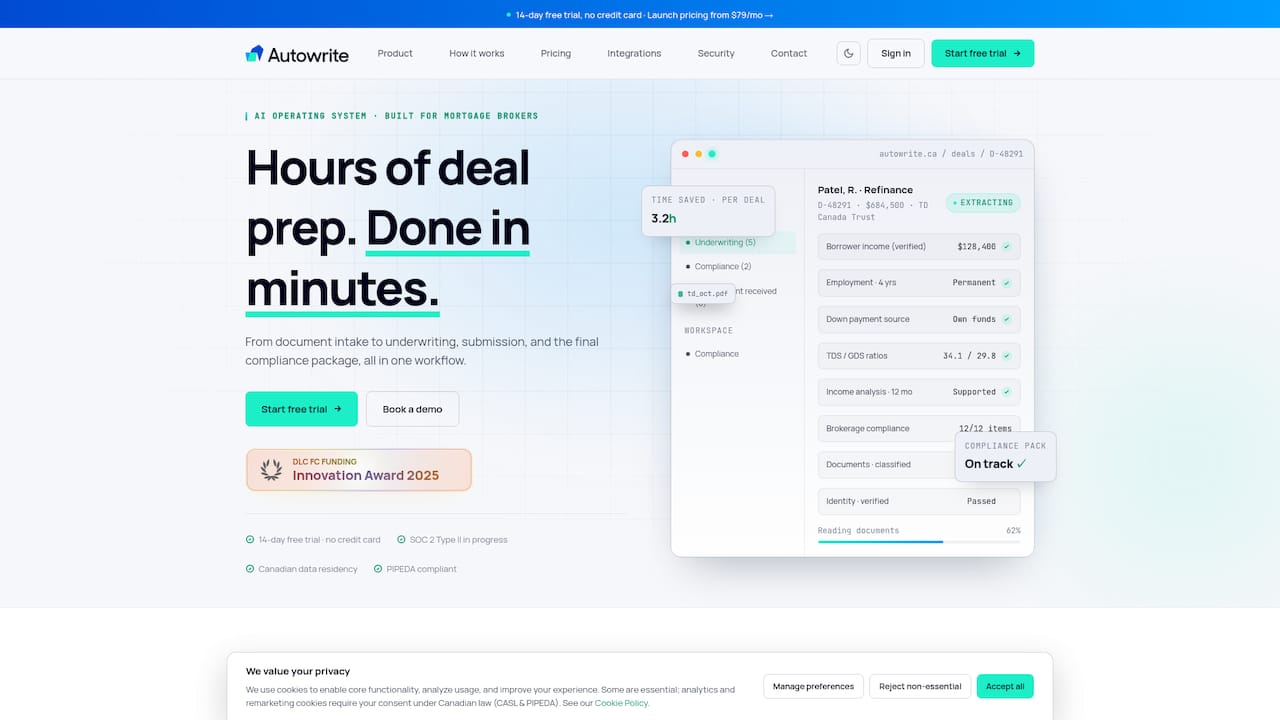
If document chasing, packaging, or pipeline tracking showed up as your top time-drain in the prioritization framework above, that's exactly what Autowrite was built to handle. Every plan starts with a 14-day free trial, and pricing runs from Starter through Legend on Autowrite's pricing page, with Enterprise available on request. Compare it against the pilot checklist from earlier in this guide, or start a trial directly through Autowrite's platform and see how many hours it reclaims on your next file.
Sources
For deeper reading on the regulatory and industry context behind this guide, see OSFI's AI and machine learning model risk guidance, FSRA's record-keeping requirements for brokerages, and Canadian Mortgage Trends' analysis on selecting AI tools.
- Before choosing an AI tool, brokers need to know what problem they’re solving — Canadian Mortgage Trends
- AI is coming for brokers’ back office — Mortgage Professional America (Canada)
- TD Bank agentic mortgages deployment — Major Matters
FAQ
What Is Mortgage Automation?
Mortgage automation uses software to handle repetitive tasks like document collection, data extraction, and status updates, so brokers spend less time on paperwork. It typically covers intake, onboarding, pipeline tracking, and communications, while underwriting decisions stay with a licensed human.
Is AI Going to Replace Mortgage Brokers?
No. Experts consistently describe AI as automating administrative infrastructure while brokers keep advisory and exception-handling work, according to Mortgage Professional America's coverage of AI's impact on broker operations. Brokerages that retrain staff to supervise automated outputs tend to come out ahead of those that resist adoption entirely.
How Is AI Being Used in Mortgage Broking?
AI currently handles document classification, data extraction, client verification, and pipeline monitoring, with adoption typically starting through chatbots and document workflows before expanding further. Mortgage-specific tool adoption still lags behind general-purpose AI use in other industries, though it's growing steadily.
How Much Does a Mortgage Broker Make on a $500,000 Mortgage?
Broker commission on a mortgage this size depends on the lender, product type, and compensation structure, and varies enough by lender and province that no single figure applies universally. What automation changes isn't the commission structure but the volume of files a broker can handle profitably within the same working hours.
What Does Autowrite Cost?
Autowrite offers a Starter plan at $149 per month, a Pro plan at $269 per month, and a Legend plan at $499 per month, with Enterprise pricing available on request, all listed on Autowrite's pricing page. Every plan includes a 14-day free trial before billing starts.