
If you are comparing Autowrite with a digital mortgage application platform, the short answer is that they start at opposite ends of the file. An application platform is built around the borrower application and the submission to lenders. Autowrite is built around the documents: it reads them, fills the underwriting form, syncs to your mortgage software and assembles the compliance package. Many brokers will use both, because the two jobs overlap less than the search results suggest.
This page sets out where each type of tool helps, what still needs your judgment, and what Autowrite costs in 2026. Our site does not name competing products, so we describe the alternative by what it does.
TL;DR
- Application platforms focus on collecting the borrower application, e-signing and submitting to lenders. Autowrite focuses on reading documents, extracting data, filling underwriting forms and preparing the compliance package.
- Autowrite plans are $99 (Starter), $199 (Pro) and $399 (Legend) per month, with Enterprise priced on request and a 14-day free trial.
- Autowrite keeps data in Canada and syncs with Canadian mortgage software, so you do not retype what the documents already say.
- AI speeds up intake and checking. The credit decision, and accountability for the file, stay with people.
- If your pain is paperwork after the borrower applies, start with document automation. If your pain is the front-end application experience, an application platform addresses that.
Table of Contents
- Two tools, two different jobs
- How a file moves through each workflow
- Where AI helps and where a person still decides
- Privacy, security and compliance questions to ask any vendor
- Pricing: what Autowrite costs
- Our perspective
- How to choose for your brokerage
- Try it on your own files
- FAQ
- Sources
Two tools, two different jobs
The confusion is understandable. Both types of product promise to take paperwork off your desk, and both talk about speed. But the work they remove sits at different stages of a mortgage file.
A digital application platform usually handles the front of the process: the borrower fills in an application, uploads documents, consents and signs, and you send the finished application to a lender. Its centre of gravity is the application and the lender submission.
Autowrite handles what happens to the paper in the middle. A borrower sends T4s, notices of assessment, pay stubs, bank statements, a purchase agreement and photo ID, in every format imaginable. Someone has to sort them, read them, key the numbers into forms, check them against each other and assemble the package the lender and your brokerage need. That someone is usually you or your assistant, and it is where hours disappear.
| Stage | Typical application platform | Autowrite |
|---|---|---|
| Borrower application | Core strength: guided online application | Not the focus |
| Document intake | Upload and storage | Classifies PDFs, photos and scans automatically |
| Data extraction | Often limited to the application fields | Extracts fields from each document with line-level confidence |
| Underwriting form | Application data carried across | Auto-fills the underwriting form from the documents |
| Income and down payment analysis | Varies by product | Built in |
| Mortgage software sync | Lender submission channel | Syncs with your mortgage software |
| Compliance package | Consent and signing | Assembles e-sign and compliance packages |
| Team pipeline | Varies by product | Supports team pipeline management |
We have kept the right-hand column to what Autowrite does and the left to the general pattern of the category. Features differ between products and change often, so confirm any specific feature with the vendor you are evaluating.
How a file moves through each workflow
A useful way to compare is to follow one purchase file from first call to funding. One Canadian industry workflow guide makes the point that the quality and completeness of intake determines whether a file is ready to submit, and that lender approvals commonly come back with conditions to clear. That matches what most brokers see: the file rarely fails at the application, it stalls at the documents.

Application and consent
This is where an application platform shines. A clean guided application, borrower consent and a tidy hand-off save real time, and they improve the borrower's first impression of you. Autowrite does not try to replace the borrower-facing experience. If your brokerage already has an application flow you like, Autowrite works behind it.
Document intake and classification
This is the first place the two diverge. Borrowers do not upload documents in the order you want. A single PDF can hold three pay stubs and a void cheque; a phone photo can be a notice of assessment sideways. Autowrite classifies PDFs, photos and scans, splits them out and files each against the right borrower and the right requirement.
The practical gain is not just speed. You see immediately what is missing, so the follow-up email to the client is one precise request instead of three vague ones.
Data extraction and underwriting forms
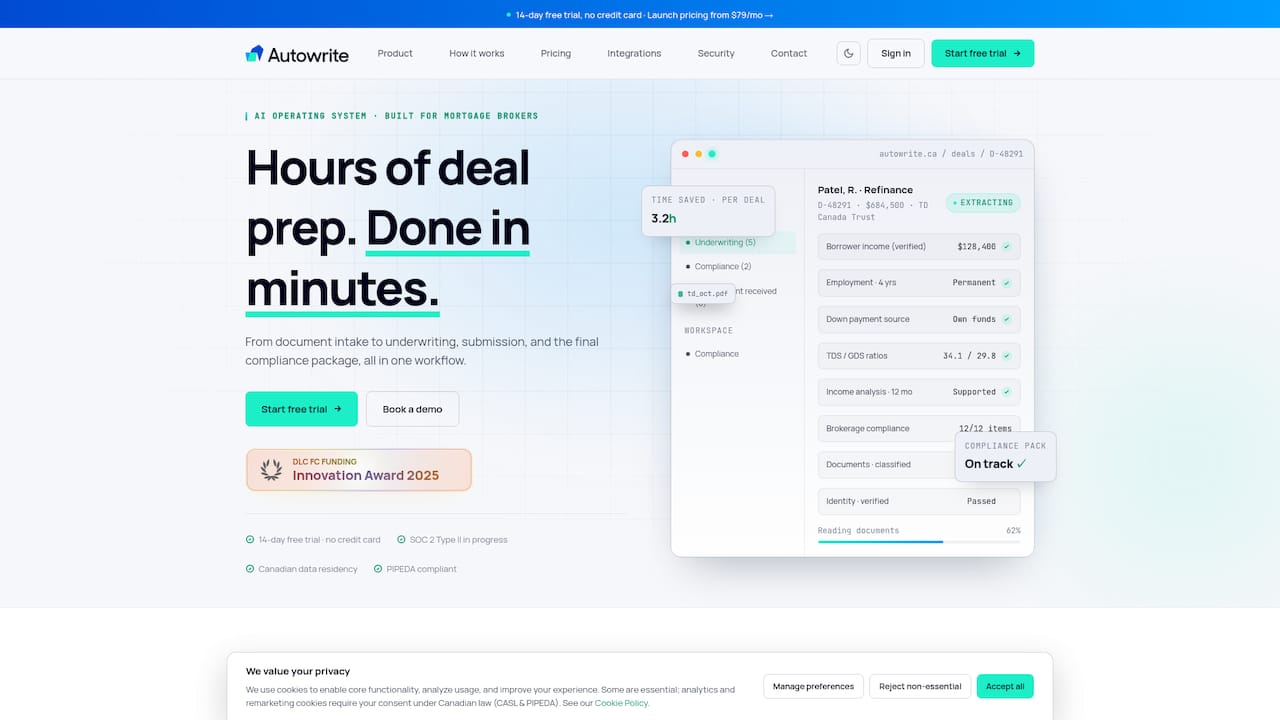
Reading a document is a different skill from collecting a form field. Autowrite extracts the figures from the documents themselves and shows line-level confidence, so you can see which values were read cleanly and which deserve a second look. It then fills the underwriting form from that data.
That confidence indicator matters. Automation that hides its uncertainty creates risk; automation that points to the one line it was unsure about lets you review in seconds. For a closer look at the checks involved, see our guide to autofilling underwriting forms and the five documents to verify.
Income and down payment analysis
Income analysis is where files get slow: self-employed averages, commission, bonus, multiple income streams. Down payment sourcing means tracing deposits through statements. Autowrite builds these analyses from the extracted documents, so you start from a draft instead of a blank spreadsheet. You still decide how a lender will treat the income, because lender policy is yours to know.
Submission and compliance packages
Lenders set their own submission requirements. One Canadian lender's published guidance, for example, asks for a complete application, credit consent and the supporting documents before an underwriter will pick the file up, and it says the underwriter stays with the file through funding to satisfy conditions. An incomplete package costs days.
Autowrite assembles the e-sign and compliance package from the documents already read, and keeps the trail of what was collected. Our write-up on automating lender submissions goes through what an audit-ready package contains, and the underwriting submission package guide lists seven core documents Canadian brokers should have in order.
Where AI helps and where a person still decides
The search results for this topic keep asking whether AI will replace underwriters. In our view, no, and the better question is which steps it should take off your plate.
Canada's federal guidance on agentic AI says such systems can execute workflow steps and flag information, but that responsible use needs clear limits, assigned accountability and human review. Accountability stays with human owners. That guidance is written for government, but the principle transfers cleanly to a brokerage.
In practice, split the work like this:
- Let the software do: classify documents, extract fields, populate forms, flag mismatches, assemble packages, remind you of what is missing.
- Keep for yourself: judging whether a document is authentic and consistent, deciding how a lender will treat unusual income, advising the client on the right product, and signing off on the file.
- Check every time: any figure the tool marks as low confidence, and any number that drives qualification, such as income and down payment.
That is why we show line-level confidence rather than a single "done" button. The aim is a faster review, not a skipped one.
Privacy, security and compliance questions to ask any vendor
Brokerage owners carry the compliance risk, so the vendor questions matter as much as the features. A forum summary from OSFI and the Global Risk Institute stresses that responsible AI governance should cover explainability, data, governance and ethics, including privacy, consent, bias mitigation, monitoring and human oversight. It also names third-party vendor dependence, cybersecurity and poor data governance among the risks for financial institutions. OSFI regulates federally regulated institutions rather than mortgage brokerages, so treat this as a sound benchmark rather than a rule that binds you. Your provincial regulator sets your obligations.
Before you sign with any platform, ask:
- Where is borrower data stored and processed? Is it in Canada?
- Who are the sub-processors, and what happens if one fails?
- Can I see how a value was extracted and trace it to the source document?
- What is logged, and for how long, if a regulator or lender asks for an audit trail?
- Which steps are automated, and where is a human required to approve?
- Can I export my files if I leave?
Autowrite is built around Canadian data residency and privacy compliance, and the compliance package it assembles is meant to be reviewed by you, not trusted blindly. Our guide on making autofill compliant and underwriter-ready in Canada covers what to check on your side.
Pricing: what Autowrite costs
Autowrite uses monthly subscription pricing, and every paid plan starts with a 14-day free trial. As published on our pricing page in October 2026:
| Plan | Price |
|---|---|
| Starter | $99 per month |
| Pro | $199 per month |
| Legend | $399 per month |
| Enterprise | Contact us, no published price |
Additional deals beyond your plan are $20 each, and pay as you go is $35 per deal. Compare that to the cost of your own time. Our research on reclaiming hours per file shows where the time goes, and a single saved assistant hour per file pays for a plan quickly on a busy month. Confirm current plan limits on the pricing page before you decide.
When you compare with an application platform, compare like with like. Ask what each price includes, how deals are counted, whether seats are charged separately and what an extra file costs. Some tools price by user, some by file, and the cheaper headline number is not always the cheaper month.
Our perspective
We built Autowrite because the paperwork on a Canadian mortgage file is not a front-end problem. The borrower's application is usually the easy part. The hard part is the pile that follows: documents in every format, figures to reconcile, forms to complete, and a compliance package that has to stand up if anyone looks at it later.

So we do not think brokers need to pick a side in this comparison. We think they need to decide where their hours actually go. If you lose them on the application experience, fix that first. If you lose them reading, retyping and checking, fix that, and do it in a way that keeps you in control.
We also think automation without visibility is a liability. That is why we show how confident the extraction is on every line, and why the final call on every file stays with the licensed professional. The brokers who get the most from this are not the ones who stop looking at files. They are the ones who look at the right ten percent of each file, and let the software handle the rest. For the wider picture of where we think the stages of Canadian mortgage operations can be automated, read our five-stage workflow research.
— Anant Bawa
How to choose for your brokerage
Use the following criteria rather than a feature checklist.
Solo broker or small team with a lot of document handling. Start with document automation. The hours you recover are the ones spent on intake and forms, and that is where Autowrite concentrates.
Brokerage owner worried about consistency and audit. Look hardest at the compliance package, the audit trail and data residency. A consistent package on every file is worth more than a fast one on some files.
Team that wants a better borrower-facing application. An application platform addresses that directly. You can still add document automation behind it.
Brokers in Ontario, British Columbia, Alberta and Quebec. Provincial rules and forms differ, so ask any vendor how it handles your province, and confirm requirements with your regulator. We cover national and provincial document expectations in our Canadian document and underwriting resources.
Whatever you choose, run a real test. Take three recent files, one clean, one messy and one self-employed, and time each stage from first document to submission-ready package. The comparison will be obvious within a week.
Try it on your own files
The fastest way to see the difference is to run your own documents through it. Autowrite plans start at $99 per month, with a 14-day free trial, and you can see every plan on our pricing page or learn more at autowrite.ca.
Bring a file that normally takes you an afternoon. If the classification, extraction and form fill do not save you time on it, you will know before you pay.
FAQ
Is Autowrite a replacement for a digital application platform?
Not exactly. Application platforms centre on the borrower application and lender submission, while Autowrite centres on document reading, underwriting forms and compliance packages. Some brokerages use one, some use both. Choose by where your time is lost today.
Will AI replace mortgage underwriters?
Unlikely in the near term. Government guidance on agentic AI calls for human checkpoints and assigned accountability, and a reported large-bank mortgage workflow still has a human underwriter making the credit decision. AI is taking over the collection, checking and form work around that decision.
How much does Autowrite cost?
Starter is $99 per month, Pro is $199 and Legend is $399. Enterprise has no published price. Extra deals are $20 each, pay as you go is $35 per deal, and paid plans begin with a 14-day free trial.
Is my clients' data kept in Canada?
Yes. Autowrite is designed around Canadian data residency and privacy compliance. Still, ask any vendor, us included, where data is stored, who processes it and what the audit trail looks like, and document the answers for your brokerage.
Do I still need to review the files?
Yes. Autowrite shows line-level confidence so you can focus on the values that need a second look, but you remain responsible for the file, the advice and the submission.
Sources
- The Mortgage Broker Workflow: Application to Funding
- Wealth One Bank of Canada: Submission Tips and FAQs
- Guide on the Use of Agentic Artificial Intelligence, Government of Canada
- Balancing Innovation and Risk: OSFI's Principles for Responsible AI
- TD Quietly Put an Agent in Charge of Its Mortgage Pipeline