
The best mortgage broker software in Canada depends on where your hours go. If most of them go to chasing, sorting and re-keying documents, an AI platform built for Canadian brokers, like Autowrite, removes the most work. If your pain is lead follow-up, a CRM comes first. If it is lender submissions, your loan origination system (LOS) matters most. This guide compares each category of tool, tells you what to ask of it, and shows how the pieces fit together in a Canadian brokerage.
TL;DR
- Mortgage broker software falls into five groups: CRM, LOS, document collection portals, AI document automation, and mortgage administration or servicing tools.
- Most brokerages need a CRM and a LOS. The biggest unclaimed time saving is in document intake, classification and form filling.
- Autowrite is our all-in-one choice for Canadian brokers: document intake to underwriting forms to compliance packages, with Canadian data residency. Plans start at $99 per month with a 14-day free trial.
- Judge any tool on Canadian lender and LOS integrations, data residency, audit-ready records and total cost per deal, not on feature lists.
Table of Contents
- The five types of mortgage broker software
- Comparison table: which type fits which brokerage
- What to compare before you buy
- How the categories work together
- Where Autowrite fits
- Picking by situation
- Perspective
- Try Autowrite on your next file
- A simple way to shortlist
- FAQ
- Sources
The five types of mortgage broker software
Search results for this topic mix very different products: lender ranking pages, loan marketplaces, loan servicing platforms and broker tools. For a licensed broker or agent, the useful split is by the job the software does.
- CRM and pipeline tools. They hold contacts, track deals by stage, and automate reminders and marketing. They do not read your documents.
- Loan origination systems (LOS). They hold the application, build the lender submission and connect to lender channels. Most Canadian brokers already run one.
- Document collection portals. They let clients upload files and e-sign. They collect, but usually leave the sorting and data entry to you or your assistant.
- AI document automation platforms. They classify uploads, extract data, fill forms and assemble packages. This is the newest group.
- Mortgage administration and servicing software. Built for private lenders and mortgage investment entities that manage loans after funding. Brokers who only originate rarely need it.
Comparison table: which type fits which brokerage
| Type | Main job | Best for | Gap to watch |
|---|---|---|---|
| CRM | Leads, follow-up, referral partners | Brokers growing a referral book | No document reading or form filling |
| LOS | Application and lender submission | Every brokerage submitting to lenders | Data entry is still manual |
| Document portal | Client upload and e-sign | Teams that collect many files per deal | Sorting and extraction left to staff |
| AI document automation | Classification, extraction, forms, packages | Brokers and teams buried in paperwork | Must sync with your LOS and keep data in Canada |
| Servicing software | Post-funding loan administration | Private lenders, MICs | Not an origination tool |
What to compare before you buy
Feature grids look alike. These criteria separate tools that work in a Canadian brokerage from tools that only demo well.
Canadian documents and workflows
Your files are T4s, T1 Generals with Notices of Assessment, pay stubs, employment letters, void cheques, property tax bills, MLS listings, purchase and sale agreements, and gift letters. A tool should recognise these by type without you teaching it. It should also fill the forms Canadian lenders actually ask for. Software designed around another country's paperwork will force you into workarounds.
Integration with your LOS
A new tool that creates a second copy of every file is a new chore. Ask which Canadian LOS platforms it syncs with, which fields move in each direction, and whether you can fix an extracted value and have the fix flow through. Our guide to building a mortgage tech stack in four weeks walks through the order in which to connect tools so nothing breaks mid-deal.
Data residency and privacy
You hold sensitive financial and identity information. Canada's federal privacy law, PIPEDA, rests on ten fair information principles that govern how personal information is collected, used, disclosed and protected, and provinces such as Quebec, Alberta and British Columbia add their own rules. Ask where a vendor stores and processes files, who can access them, and how they are deleted. Our piece on privacy controls for mortgage data syncing lists six to look for.
Compliance and record keeping
Regulators expect complete records. In Ontario, for example, the Financial Services Regulatory Authority sets out the records a mortgage brokerage must keep under O. Reg. 188/08, including how long and where they are held. Good software makes this the default: every document filed, every version dated, every package reproducible. See also our notes on audit-ready digital compliance records. Check your own regulator, whether FSRA, BCFSA, the AMF or the Alberta authority, for the rules that apply to you.
Real cost per deal
A low monthly fee can hide per-user charges, per-file fees, setup costs and renewal increases. Add everything up for a typical month of closed deals. Our guides on mortgage software costs in Canada and on avoiding steep renewals show what to ask before signing.
Accuracy you can see
AI extraction is only useful if you can verify it quickly. Look for confidence shown per line, so you review the doubtful values and skip the rest, rather than re-reading entire statements.
How the categories work together
No single tool replaces your whole stack, and you should not try to swap everything at once. A typical Canadian brokerage looks like this:
- A CRM captures the lead and the referral source.
- The client uploads documents to one place.
- An AI platform classifies and reads the files, flags gaps and fills forms.
- The LOS receives clean data and builds the lender submission.
- E-sign and the compliance package close the file.
If you already like your CRM and LOS, the fastest win is usually the automation layer between the client's upload and the lender submission, because that is where staff retype the same numbers into three systems. Your CRM also depends on reliable email: contacts, calendars and sync matter, and this walkthrough of email contact management covers how to keep them organised and protected.
Where Autowrite fits
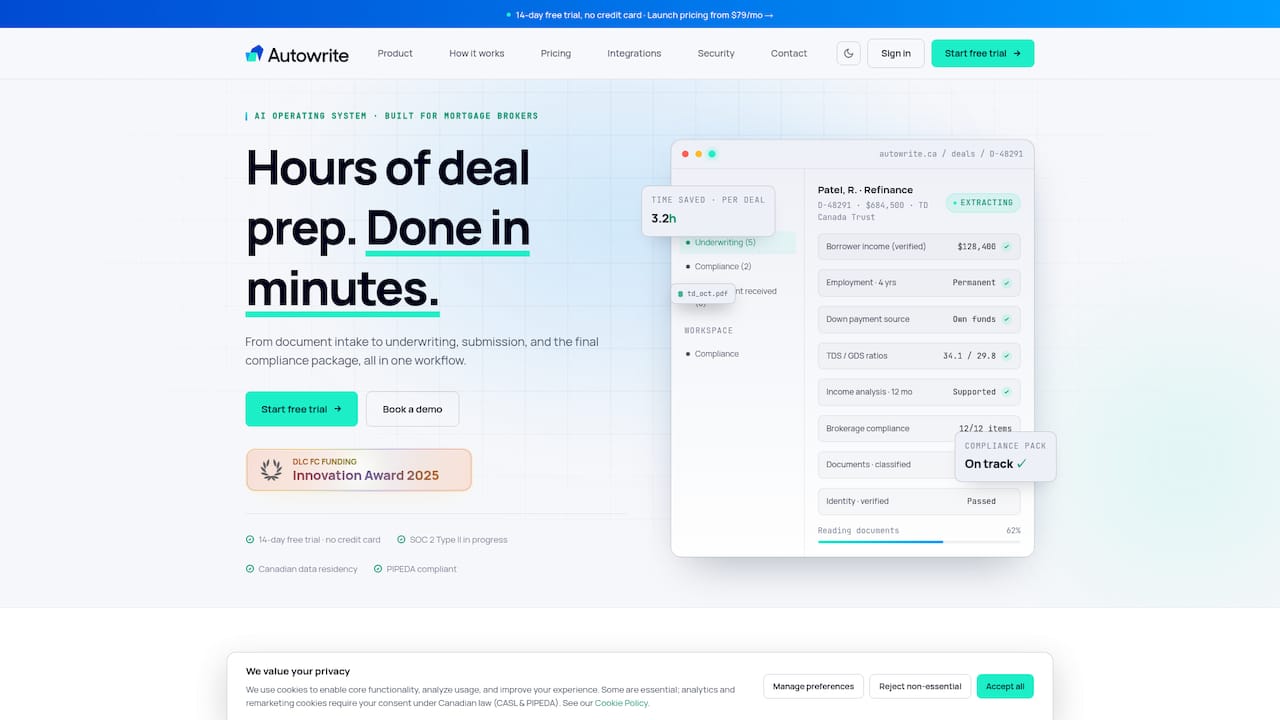
Autowrite is an AI-powered operating system for Canadian mortgage brokers. We built it for the paperwork between the first client upload and the lender submission. Based on what we have built, it is designed to:
- take in documents and classify them automatically;
- extract data with line-level confidence, so you see what to check;
- auto-fill underwriting forms;
- sync with mortgage software you already use;
- assemble e-sign and compliance packages;
- provide income and down payment analysis;
- support team pipeline management;
- keep data in Canada.
It is built for licensed brokers, mortgage agents and brokerage owners in Ontario, British Columbia, Quebec, Alberta and across Canada, not for borrowers organising their own files. For a deeper look at the category, read our guides to mortgage document automation software and AI mortgage software for Canadian brokers, and how document classification supports compliance.
Picking by situation
Solo agent starting out. You need a LOS access through your brokerage and one tool that kills admin. Start with automation, add a CRM when your referral list outgrows a spreadsheet.
Agent hiring an assistant. Before paying for another salary, look at which assistant tasks are document sorting and data entry. Software can take those over, and your assistant can then spend time on lender follow-up and client contact.
Brokerage owner. Your priorities are consistency across agents, supervision and audit readiness. Prioritise shared pipelines, standard compliance packages and records that any file reviewer can open.
Tech-savvy team. Ask about integrations, exports and how data moves between systems. You will get the most from tools that talk to each other.

Private lender. If you are adding AI workflows to underwriting intake, look for classification and extraction first, then servicing tools for post-funding administration.
Perspective
We hear the same thing from brokers in every province: the work that wears them down is not advising clients, it is the third request for the same pay stub, the retyping of a Notice of Assessment into a form, and the scramble to assemble a package that will hold up in a file review.
That is why we built Autowrite around the whole document journey instead of one slice of it. When intake, classification, extraction, forms and compliance packages sit in one platform made for Canadian brokers, nothing gets lost between tools, and the broker sees line-level confidence on every extracted value.
Our view is that the best stack is one where the broker's time goes to clients and deals. Keep the CRM and LOS you like, and let an operating system for paperwork carry the rest, with data staying in Canada.
Anant Bawa
Try Autowrite on your next file
Autowrite is subscription software with a 14-day free trial for licensed mortgage professionals. Plans are Starter at $99 per month, Pro at $199 per month and Legend at $399 per month. Enterprise is available for larger organisations, and additional deals cost $20 each. There is also a pay-as-you-go option at $35 per deal.
See what is included in each plan on the Autowrite pricing page, or learn more at autowrite.ca.
A simple way to shortlist
- Time one file. Note how many minutes go to sorting, retyping and packaging.
- List your must-keep tools, usually your LOS and CRM.
- Write your non-negotiables: Canadian data residency, your regulator's record rules, lender coverage.
- Price a normal month, including per-deal fees.
- Run one live file through your shortlisted tool during the trial and compare the time saved.
If you want a view of where the market is heading, our overview of mortgage tech trends in Canada covers the AI forms drawing regulatory attention.
FAQ
What is the best mortgage broker software in Canada?
There is no single product for every job, because brokers need a CRM, a LOS and a way to handle documents. For the paperwork side, Autowrite is built specifically for Canadian brokers and covers intake, extraction, forms and compliance packages in one platform. Pair it with the CRM and LOS you already use.
How much does mortgage broker software cost in Canada?
Costs vary widely by category and by how fees are structured. Autowrite plans run $99, $199 and $399 per month, with $20 for each additional deal and a $35 pay-as-you-go option. Always total monthly fees, per-deal charges and renewal terms for a typical month.
Does mortgage software need to keep data in Canada?
Canadian law does not give one simple rule for every case, but privacy obligations under PIPEDA and provincial laws apply to the personal information you collect. Many brokers prefer Canadian data residency to simplify client trust and vendor questions. Autowrite provides Canadian data residency, and you should confirm the same with any vendor.
Can AI software replace my mortgage assistant?
It takes over repetitive document sorting, data extraction and form filling, so the same team handles more files. People still manage client relationships, lender conversations and judgment calls. Many agents use it so they can grow without hiring for admin.
Sources
- PIPEDA fair information principles, Office of the Privacy Commissioner of Canada
- Mortgage brokerage and administrator records management and up-front fees, FSRA