

The best AI mortgage software for a Canadian broker is the one that removes paperwork from the file you are working on today, keeps client data in Canada, and leaves you with a clear record of who approved what. In 2026 that usually means choosing between four kinds of tools: a full operating system built for Canadian brokers, an enterprise loan-origination system, a broker CRM with AI add-ons, and single-purpose document tools. This guide compares them on the criteria that matter to a brokerage, and shows where Autowrite fits.
TL;DR
- Most brokers lose their time to documents, not to advice: intake, sorting, re-keying and compliance packages. Start your evaluation there.
- Four categories compete: Canada-specific AI operating systems, enterprise loan-origination systems, broker CRMs with AI features, and standalone OCR or chat tools.
- Check data residency, consent handling, audit trails and human sign-off before you check features. Regulators such as FSRA flag AI, fraud and IT risk as supervisory concerns.
- Autowrite is priced at $99, $199 and $399 per month for Starter, Pro and Legend, with a 14-day free trial and an Enterprise plan for larger teams.
- Run any tool on five real, closed files before you commit, and measure hours saved per file.
Table of Contents
- What AI mortgage software actually does for a broker
- The four kinds of tools Canadian brokers compare
- How the categories compare
- Where Autowrite fits
- What to check before you adopt any AI tool
- Risks and limits of AI in mortgage processing
- How to organize documents and verify AI-extracted data
- How to choose for your brokerage
- Try Autowrite on your own files
- Our perspective
- FAQ
- Sources
What AI mortgage software actually does for a broker
The label "AI mortgage software" covers very different products. Before comparing names, compare jobs. A Canadian broker's file passes through the same stages whatever the lender: collecting documents, classifying them, pulling out the numbers, filling in application and underwriting forms, checking income and down payment, assembling a package for the lender, and keeping proof that the compliance steps were done.

AI is useful at the repetitive middle of that chain. Document intelligence reads a T4, a Notice of Assessment, a pay stub, a bank statement or a purchase agreement, decides what it is, and extracts the fields. Those fields then flow into forms and into your mortgage software so nobody retypes them. Our own write-up of five workflow stages vendors should automate walks through that chain stage by stage, and our guide to AI document automation for mortgage brokers in Canada goes deeper on the intake step.
What AI should not do is decide suitability for your client or tell you a lender's policy from memory. Those stay with you, and we come back to that in the risks section.
The four kinds of tools Canadian brokers compare
1. AI operating systems built for Canadian brokers
These cover the whole file: intake, classification, extraction, form auto-fill, income and down payment analysis, e-sign and compliance packages, and team pipeline views. Their advantage is that one document read feeds every later step. Their limit is that they are newer than the established systems, so check integrations with the mortgage software you already use.
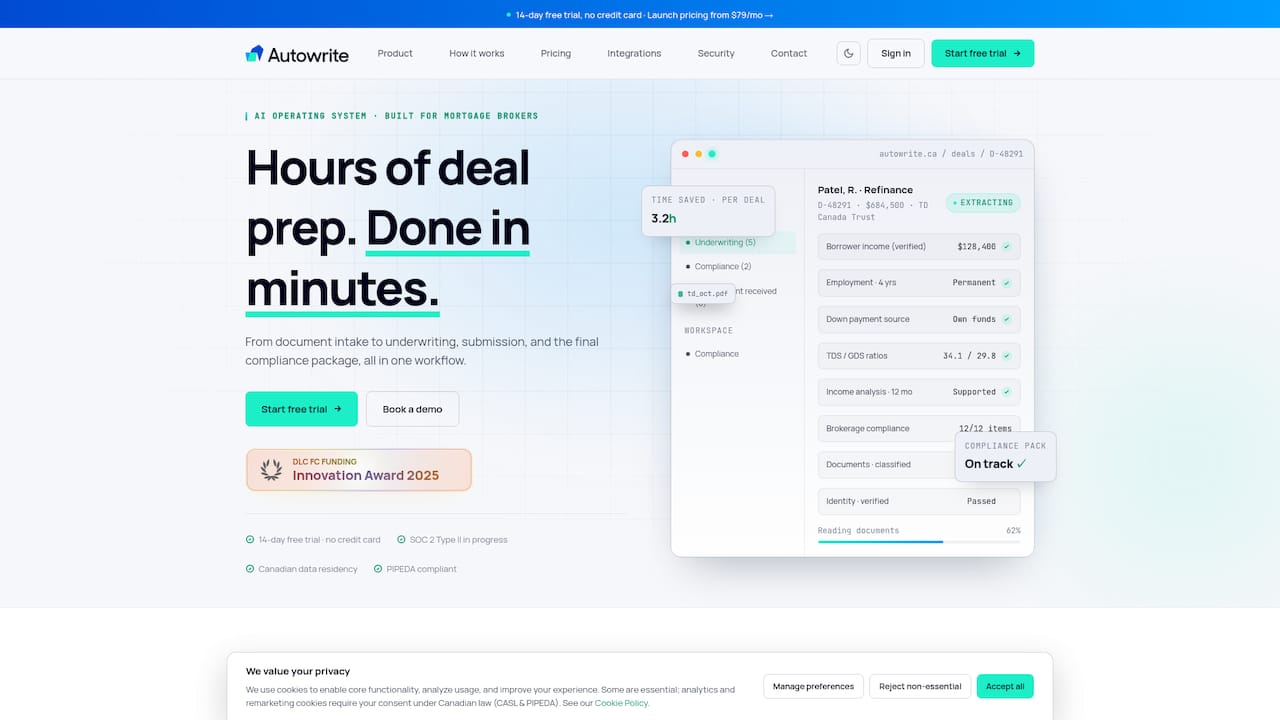
Autowrite belongs here. It is an AI-powered operating system designed for Canadian mortgage brokers, and it is built around Canadian documents, Canadian data residency and Canadian compliance packages.
2. Enterprise loan-origination systems
Large loan-origination platforms are designed for lenders and big originators. They are deep, configurable and often tied to a lender's own processes. Pricing is rarely published: a review of one major enterprise platform describes seat, transaction, module and implementation costs that vary by volume and contract, and that review covers the United States market, so treat it as an indication of how enterprise pricing works rather than a Canadian price list. For a small or mid-sized brokerage, implementation time and contract size are the main hurdles.
When you weigh any software cost, it helps to think in per-file terms. Brokers who quote clients on prepayment strategy will recognise the same logic in a guide to how extra mortgage payments save money: a small recurring amount is judged against the total it changes. A subscription is judged the same way, against hours returned on each file.
3. Broker CRMs with AI features
CRMs manage leads, follow-ups, email campaigns, referral partners and renewals. Many now add AI drafting or summarising. They are excellent for the front of the funnel and for retention, but most do not read the documents in a file or build the lender package. If your bottleneck is lead follow-up, a CRM is the right first purchase. If it is paperwork, it is not.
4. Standalone OCR, chat and automation tools
General AI assistants and single-purpose OCR tools are cheap and flexible. They can summarise a document or extract a table. The trade-offs are what a brokerage cannot see: where the data is stored, whether the vendor trains on it, whether there is an audit trail, and how the output gets into your system. For files containing SINs, bank statements and addresses, those questions matter more than the price.
How the categories compare
| Criterion | Canada-specific AI operating system | Enterprise loan-origination system | Broker CRM with AI | Standalone OCR or chat tool |
|---|---|---|---|---|
| Main job | Whole file, intake to package | Lender-scale origination | Leads, follow-up, retention | One task, such as reading a document |
| Fit for a small or mid-sized brokerage | Strong | Often heavy | Strong for sales | Flexible, but manual |
| Canadian documents and compliance | Built in for Canada | Varies by deployment | Limited to client management | Generic |
| Canadian data residency | Check vendor; Autowrite states it | Varies by contract | Varies | Often unclear |
| Pricing | Published tiers at some vendors | Usually quote-based | Usually per seat | Usually low, per use |
| Setup effort | Days to weeks | Weeks to months | Days | Minutes, but manual workflow |
The table is a guide to categories, not a ranking of individual products. Within each category the details differ, so test the specific tool.
Where Autowrite fits
Autowrite is built for licensed Canadian mortgage brokers, agents and brokerage owners. According to our product scope, it handles:
- document intake and classification;
- data extraction with line-level confidence, so you can see how sure the system is about each figure;
- auto-fill of underwriting forms;
- sync with mortgage software;
- e-sign and compliance package assembly;
- income and down payment analysis;
- team pipeline management;
- Canadian data residency.
The point of putting these in one platform is that the document is read once. The same extracted income figure that fills the form also feeds the income analysis and the lender package. If you want to see how that plays out on specific tasks, we have written on mortgage OCR for Canadian brokers, underwriting automation and task automation across the file.
What it costs
Plans on the Autowrite pricing page are billed monthly or annually:
| Plan | Price |
|---|---|
| Starter | $99 per month |
| Pro | $199 per month |
| Legend | $399 per month |
| Enterprise | No published price |
An additional deal is $20 per deal, and pay as you go is $35 one-off. Every paid plan starts with a 14-day free trial. Check the pricing page for what each plan includes before you choose, since it is the current source.
To judge value, take a file you closed recently, count the hours spent on intake, sorting, re-keying and package assembly, and multiply by your own hourly value. If a plan returns even a few of those hours a month, the subscription has paid for itself. We discuss realistic ranges in our piece on reclaiming hours per file.
What to check before you adopt any AI tool
Privacy, consent and data residency
Your client files hold some of the most sensitive data a person has. FSRA's guidance for mortgage brokers says regulated persons must protect client information, use and disclose it only for consented or legally required purposes, and apply cybersecurity controls proportionate to the brokerage's size and structure, as set out in the FSRA 2025-28 business plan. That plan also names AI, fraud and IT risk as supervisory issues. Ontario brokers can read our summary of what to keep on file for FSRA.
Brokers in British Columbia, Alberta and Quebec answer to their own provincial regulators, so confirm the requirements that apply where you are licensed. Then ask every vendor these questions in writing:
- Where are documents stored and processed, and is it in Canada?
- Is client data used to train models, and can that be switched off?
- Who at the vendor can see files, and is access logged?
- What is the incident notification process?
- What happens to the data if you cancel?
Where federal rules are heading
The proposed Consumer Privacy Protection Act and the Artificial Intelligence and Data Act were tabled in Bill C-27. AIDA would have set common requirements for AI systems, including measures to mitigate risks of harm and biased output. Check the current status of federal privacy and AI legislation before you rely on it, but a vendor that already documents how it manages risk is better prepared whatever happens.
There is also movement on income verification. The CRA consulted mortgage professionals in fall 2024 on a possible digital tool, and participants suggested API integration with existing mortgage platforms and stressed security and borrower consent. Software that already syncs cleanly with your mortgage systems will be easier to extend if such a tool arrives.
FINTRAC and the compliance package
Identity verification, record keeping and reporting are part of every file. A tool earns its keep when it assembles the package in the same way every time and flags what is missing. See our FINTRAC checklist for the mortgage compliance package for the elements to look for.
Risks and limits of AI in mortgage processing
AI makes specific, predictable mistakes, and your brokerage is accountable for the file regardless of who or what prepared it. The main risks are:
- Extraction errors. A misread digit in an income figure can change a qualification result.
- Stale or invented lender policy. A chat assistant can answer confidently about a lender's rules and be wrong or out of date.
- Unsuitable recommendations. FSRA's view is that AI can improve back-office efficiency, while regulation stays focused on suitable recommendations, consumer outcomes, fraud prevention and accountability, per the business plan.
- Privacy and residency gaps. Data processed outside Canada, or kept longer than needed.
- Over-automation. Nobody looks at the file because the system said it was fine.
- Outages. A tool that is down on a submission deadline day.
The controls are straightforward: keep a person's approval before anything goes to a lender, keep audit trails, set access controls and retention rules, test on real files, and keep a manual fallback. Our overview of mortgage tech trends and AI forms under OSFI scrutiny covers where scrutiny is heading for lenders, which affects what they will ask of brokers.
How to organize documents and verify AI-extracted data
The best software cannot fix a messy intake. A reliable routine looks like this:
- Send one checklist per file type. Salaried, self-employed, rental income and purchase with gifted down payment each need different documents. Give clients the right list at the start.
- Use consistent naming and one home for every file. Automatic classification helps, but you should still be able to find a document in seconds.
- Review low-confidence fields first. Line-level confidence shows which numbers the system is unsure about. Check those against the source document.
- Cross-check totals. Compare income on the T4 and Notice of Assessment, and match down payment sources to bank statements.
- Approve before submission. A named person signs off, and the system records it.
- Archive the package. Keep the final submission and its proofs under your retention rules.
Spot-checking is not a weakness of AI workflows. It is the part that keeps them safe.
How to choose for your brokerage
Start from the bottleneck
Write down the three tasks that eat the most hours. If they are documents, forms and packages, you need a file-level tool. If they are lead follow-up and renewals, you need a CRM. If you are a lender or a very large originator, an enterprise system may be appropriate.
Match team size and lender mix
A solo agent needs fast setup and a low monthly cost. A team needs pipeline visibility, roles and permissions. A larger brokerage needs support, contract terms and possibly custom configuration. Ask how the tool handles the lenders you actually submit to, including the ones you use least.
Run a real trial
Use the free trial on five closed files of different types. Time each stage before and after, count corrections you had to make, and ask a colleague to check the output. Our guide to building a Canadian mortgage tech stack in four weeks lays out a rollout plan that keeps risk low.
Try Autowrite on your own files
If paperwork is where your week goes, Autowrite is built for exactly that problem in a Canadian setting: Canadian documents, Canadian data residency and compliance packages assembled for you. Start with the 14-day free trial, run it on a few real files, and compare the hours. Plans and per-deal fees are on the pricing page.
Our perspective
We built Autowrite because brokers told us the same thing: the advice is the job, and the paperwork is what crowds it out. We do not think the answer is a smarter chat box bolted onto a system designed for another country. It is a platform that understands Canadian documents, reads them once, shows how confident it is in each figure, and leaves the decision with the licensed professional.
That is why we put line-level confidence and compliance packages at the centre of the product, and why we keep data in Canada. Speed matters, but a broker who has to recheck everything has gained nothing. Trust comes from being able to see what the system did and approve it.
Our advice for any brokerage: pick the category by your bottleneck, test on real files, and insist on written answers about residency and consent. If a tool passes that, the hours come back.
— Anant Bawa
FAQ
What software do mortgage brokers in Canada use?
Most brokers combine a mortgage origination or submission system, a CRM for leads and renewals, e-signature and document storage, and increasingly an AI layer for document intake and extraction. An AI operating system such as Autowrite can sit across the file and sync with the mortgage software you already use.
Is AI mortgage software allowed under Canadian regulation?
There is no blanket ban. Regulators expect you to protect client information, use it only for consented purposes, and stay accountable for suitable advice. FSRA flags AI, fraud and IT risk as supervisory issues, so keep human approval and records. Confirm requirements with your provincial regulator.
How much does AI mortgage software cost?
It ranges from low-cost per-use tools to quote-based enterprise systems. Autowrite plans are $99, $199 and $399 per month for Starter, Pro and Legend, plus $20 per additional deal, and Enterprise is not priced publicly. A 14-day free trial lets you test before paying.
Can AI replace a mortgage assistant?
It replaces much of the repetitive work an assistant does, such as sorting documents and re-keying figures. It does not replace judgment, client contact or the final review. Many brokers use software to let an assistant, or themselves, handle more files with fewer errors.
Sources
- FSRA Annual Business Plan 2025-28
- Bill C-27: An Act to enact the Consumer Privacy Protection Act and AIDA
- CRA: Mortgage Industry Consultation on a Potential Income Verification Tool
- Encompass Review 2026: ICE Mortgage Technology LOS and AI