

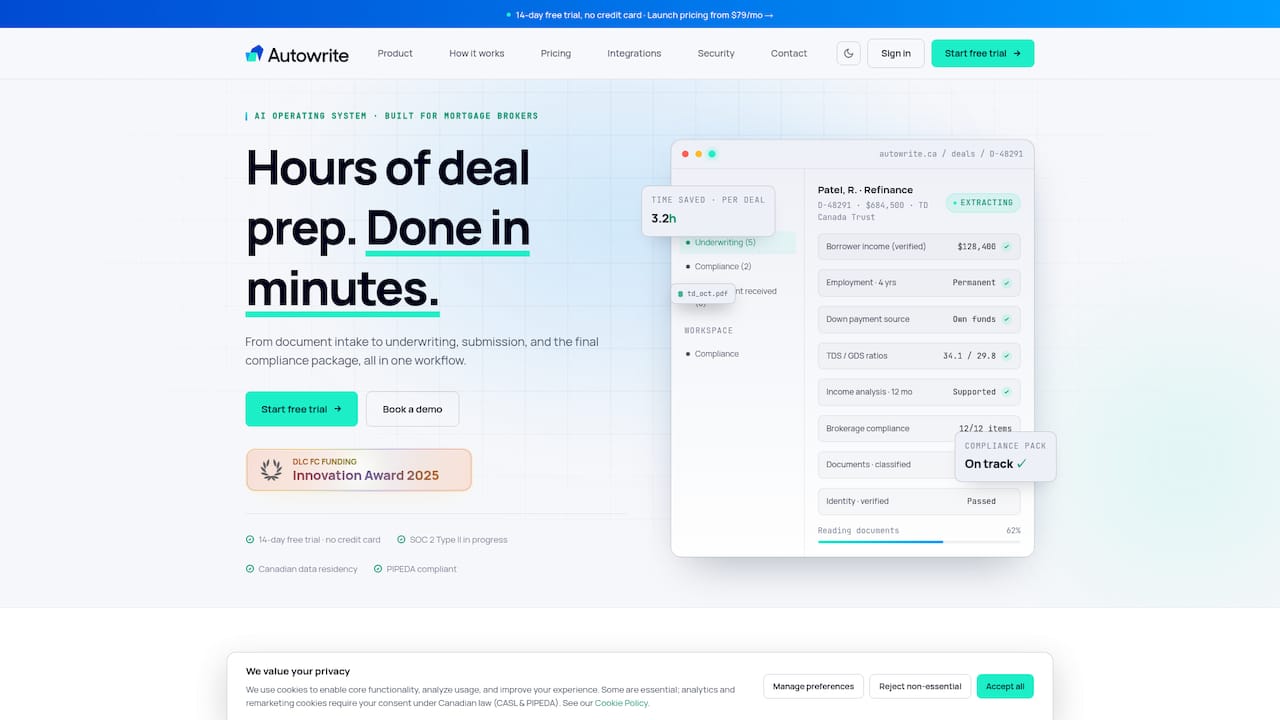
The best mortgage compliance software for a Canadian broker is the one that builds the compliance file while the deal is being worked, not after it. That means document intake, identity checks, suitability notes, disclosures and retention in one place, with Canadian data residency. Autowrite is built for exactly that job: an AI-powered operating system for Canadian mortgage brokers that handles intake, classification, data extraction, underwriting forms and compliance packages in one platform.
Below, we compare the main types of tools brokers use, set out what regulators in Ontario, British Columbia and the rest of Canada expect to see in a file, and show what each type of software does about it.
TL;DR
- Compliance is a file problem: regulators and FINTRAC ask whether you can produce the records, not whether you own a tool.
- A CRM, a loan origination system and an e-sign tool each cover a slice. A purpose-built platform covers intake to compliance package in one flow.
- Autowrite automates document intake, classification and extraction, assembles e-sign and compliance packages, and keeps data in Canada.
- Plans start at $99 per month, with a 14-day free trial.
- BC's new Mortgage Services Rules, effective October 13, 2026, add disclosure forms and written policies that make a structured file more valuable.
Table of Contents
- What "compliance software" has to do for a Canadian broker
- What regulators have changed and what they ask for
- The main kinds of software brokers use
- How to evaluate mortgage compliance software
- Why a purpose-built platform wins on compliance
- Which brokers benefit most
- Perspective
- Get started with Autowrite
- FAQ
- Sources
What "compliance software" has to do for a Canadian broker
No single national rulebook governs a mortgage file. Provincial regulators set licensing and conduct rules, and the federal financial intelligence unit, FINTRAC, sets anti-money-laundering record keeping for brokers, administrators and lenders. Software that claims to handle compliance has to serve both layers.
In practice a brokerage needs to prove five things on any file:
- Who the client is. Identity verification and know-your-client (KYC) records.
- What you recommended and why. Suitability and needs documentation.
- What the client was told. Disclosure of representation, risks and conflicts of interest.
- What you received. The source documents, classified and tied to the figures used in the submission.
- How long you kept it. Retention that survives staff turnover and a system change.
FINTRAC's guidance for mortgage administrators, brokers and lenders says copies of reports and the related records must be kept for at least five years from the date they were created. Ontario files carry their own retention expectations, which we compare in our guide to FINTRAC's five-year and FSRA's six-year retention on mortgage files.
What regulators have changed and what they ask for
Ontario: FSRA and the Annual Information Return
Every licensed Ontario mortgage brokerage and administrator must file an Annual Information Return by March 31 each year under Ontario Regulation 193/08 and the Mortgage Brokerages, Lenders and Administrators Act, 2006. FSRA's page says it is filed electronically through Licensing Link, and that the 2026 updates added new qualifying questions and removed the NQSMI Transactional Report for brokerages. Answering those questions honestly is far easier when your pipeline, files and licence details sit in one organized system.
FSRA also publishes what happens when records are weak. Its Enforcement Annual Report for fiscal 2024-25 records the revocation of one brokerage's licence and $50,000 in administrative monetary penalties (AMPs) on its broker and principal broker. The failures included suitability steps on six private mortgages, disclosure of material risks and conflicts, and retention of required records. In the same report, another brokerage paid a $17,500 AMP and its principal broker $15,000 for record-keeping failures. Each of those findings is a file problem. Our walkthrough of the three proofs Ontario brokers must keep on file covers them in detail.

British Columbia: the Mortgage Services Rules
BC is where the rules moved most recently. The Mortgage Services Rules, made by Order in Council 352/2025, take effect on October 13, 2026. They require brokerages to establish policies and procedures covering identity verification, suitability and material-risk disclosure, and conflicts of interest.
BCFSA has also authorized a set of disclosure forms. Its regulatory statement on disclosures and forms packages lists Forms 1A, 1B and 1C (Disclosure of Representation), Forms 2A, 2B and 2C (Disclosure of Risks to Unrepresented Parties), and four combined Forms Packages, all version 1.0 dated October 13, 2026. For a BC broker, a compliance tool should be able to assemble the right package for the deal and keep the signed copy with the file.
Brokers moving from the old Mortgage Brokers Act to the new licensing regime also face application requirements, set out in BCFSA's transition statement. It covers details such as the proposed principal broker, completed transition education and trust-account information where applicable.
Quebec and Alberta
Quebec and Alberta each have their own regulator and their own conduct rules, so a broker licensed there should confirm the specifics with that regulator rather than assume Ontario or BC practice carries over. What carries over is the FINTRAC layer and the underlying need: a complete, retrievable file for every transaction.
The main kinds of software brokers use
Brokers rarely buy "compliance software" as a category. They assemble a stack. Here is how the common types compare on the five file requirements above.
| Type of tool | Identity and KYC | Suitability and disclosure packages | Document intake and extraction | Retention and audit trail | Built for Canadian brokers |
|---|---|---|---|---|---|
| Autowrite (purpose-built platform) | Yes, within the workflow | Assembles e-sign and compliance packages | Automatic classification and data extraction | Compliance and Canadian data residency | Yes |
| General CRM | Contact records only | Manual templates | Attachments, no extraction | Depends on how staff file things | Usually not |
| Loan origination system | Partial | Limited to the submission | Manual entry | Deal-level only | Partly |
| E-signature tool | Signer verification | Signing only | None | Signed copies only | No |
| Shared drive and spreadsheets | Manual | Manual | Manual | Depends on discipline | No |
Each of the other types does one job well. The CRM keeps relationships, the origination system submits deals, the e-signature tool captures signatures. None of them reads a pay stub, checks it against the application, builds the compliance package and files everything together. That gap is where file errors, and regulators' findings, tend to start.
How to evaluate mortgage compliance software
Use these criteria when you compare any option. We list them in the order that matters most to a brokerage owner.
1. Does it build the file as work happens?
A tool that asks staff to upload and tag documents after the deal is submitted relies on discipline. A tool that classifies documents on intake and extracts the data does the filing for you. Autowrite classifies documents automatically, extracts the data and shows line-level confidence on what it extracted, so a reviewer sees which values to check. For a deeper look at the category, see our guide to mortgage document automation software in Canada. A useful framework for weighing mortgage document automation criteria such as accuracy, exceptions handling and integration is worth reading alongside it.

2. Does it assemble the packages regulators expect?
In BC that means the disclosure forms and packages above. In Ontario it means the suitability, KYC and disclosure evidence FSRA looks for. Autowrite assembles e-sign and compliance packages as part of the workflow, so the package is a by-product of the deal rather than a separate chore.
3. Does it fit the systems you already run?
A compliance tool that forces double entry creates errors. Autowrite auto-fills underwriting forms and syncs with mortgage software, with native integrations to Canadian loan origination systems, so the data you extract once flows to where you submit.
4. Where does the data live?
Client files contain identity documents, income records and banking details. Autowrite provides Canadian data residency with full privacy compliance, which matters to brokerage owners who must answer for where client information is held.
5. Can a principal broker oversee the team?
Oversight is the heart of the Ontario and BC rules: written procedures plus evidence they are followed. Autowrite supports team pipeline management, so an owner can see where each file stands. Our piece on audit trails that let you produce a full file in 30 days shows what that evidence looks like.
6. What does it cost, and what else is billed?
Subscription tools usually charge a monthly or annual plan, and some add per-deal fees. Ask for the full structure before comparing. Autowrite's published pricing is below.
| Plan or fee | Price |
|---|---|
| Starter | $99 per month |
| Pro | $199 per month |
| Legend | $399 per month |
| Enterprise | Contact us for pricing |
| Additional deal | $20 one-off per deal |
| Pay as you go | $35 one-off |
Billing is monthly or annual, and paid plans include a 14-day free trial.
Why a purpose-built platform wins on compliance
A brokerage that stitches together a CRM, a drive, an e-signature tool and a set of checklists depends on people remembering which step goes where. Every handoff is a place where a document goes missing or a disclosure is not saved with the file. The FSRA enforcement findings above are not about exotic failures. They are about suitability steps, disclosures and records not being there when asked.
A single platform changes the unit of work. The document comes in, is classified, feeds the underwriting form, and ends up in the compliance package. Income and down payment analysis sit on the same extracted data. The compliance file is the working file, so there is one version of the truth to produce for an auditor, a principal broker or an examiner.
It also changes the economics. Autowrite is designed to turn hours of paperwork into minutes, which lets a broker or agent spend the saved time on clients. For a small team, our guide to mortgage broker software for small brokerages shows how the plans map to deal volume. For FINTRAC specifically, see our FINTRAC compliance checklist and the guide on KYC requirements for mortgage brokers.
Which brokers benefit most
- Solo agents and small teams who want an assistant's worth of paperwork handled without a hire. Starter at $99 per month is the entry point.
- Growing brokerages that need consistent files across agents and a view of every pipeline. Pro at $199 per month and Legend at $399 per month suit higher volumes.
- Brokerage owners and principal brokers who carry the compliance accountability and want files that look the same no matter who built them.
- Brokers in Ontario, British Columbia, Quebec and Alberta, since the platform is built for Canadian brokers and keeps data in Canada.
- Private lenders adding AI-powered workflows to document handling and underwriting support.
- Larger organizations can ask about Enterprise, which has no published price.
The software is bought and used by licensed brokers, agents and brokerages. Borrowers organizing their own documents are not the audience: your broker handles that part.
Perspective
Compliance failures in mortgage brokering are almost never about intent. They come from a file that was assembled late, by someone in a hurry, from documents scattered across email, a drive and a CRM.
We built Autowrite on one belief: the compliance record should be created by doing the work, not by reconstructing it. When intake, classification, extraction, underwriting forms and compliance packages live in one flow, the file is complete when the deal is.
That is why we focus on Canadian brokers specifically: Canadian origination systems, Canadian data residency and Canadian packages. A tool designed around another country's paperwork will always be adapting. Ours starts from the files you actually handle.
Anant Bawa
Get started with Autowrite
If you are ready to move your files into one compliant workflow, Autowrite's plans start at $99 per month and include a 14-day free trial. Review the plans and fees on Autowrite's pricing page and pick the tier that matches your deal volume.
Prefer to see the category first? Our guide to compliance automation for Canadian brokers explains how automated packages stand up to FINTRAC review, and our note on audit-ready digital compliance records shows how records are kept ready.
FAQ
What is the best mortgage compliance software for Canadian brokers?
The best choice is a platform built for Canadian brokers that creates the compliance file as the deal moves. Autowrite does this by classifying documents, extracting data, filling underwriting forms and assembling e-sign and compliance packages, with Canadian data residency. Plans start at $99 per month.
Do BC brokers need new disclosure forms in 2026?
BCFSA's regulatory statement authorizes disclosure forms and forms packages effective October 13, 2026, alongside the Mortgage Services Rules. Brokerages must also have policies and procedures on identity verification, suitability and conflicts. Autowrite assembles compliance packages so the signed forms stay with the file.
How long must mortgage brokers keep records in Canada?
FINTRAC's guidance for mortgage administrators, brokers and lenders requires at least five years for the records and reports it lists. Provincial regulators such as FSRA add their own expectations, so brokers should follow the longer applicable period. A system that retains files automatically takes the tracking off your desk.
How much does Autowrite cost?
Starter is $99 per month, Pro is $199 per month and Legend is $399 per month, billed monthly or annually. Additional deals cost $20 each, pay as you go is $35 one-off, and Enterprise has no published price. Paid plans include a 14-day free trial.
Sources
- FINTRAC: Record keeping requirements for mortgage administrators, brokers and lenders
- FSRA: Annual Information Returns (AIR)
- FSRA: Enforcement Annual Report Fiscal 2024-25
- Province of BC: Order in Council 352/2025
- BCFSA: Disclosures, Representation and Forms Packages
- BCFSA: Transition, Required Form and Content of Licence Applications